What Is KeyAPI? A Unified Social Media API for Developers, Data Teams, and AI Workflows


If you land on KeyAPI for the first time, the main question is usually not technical. It is simpler than that: what is this product, and why would anyone use it instead of connecting social platforms one by one? KeyAPI is a unified social media API that helps developers, data teams, and AI workflow builders work with multi-platform social data through one cleaner access layer. Instead of treating every platform as a separate integration problem, KeyAPI gives teams a more practical way to build dashboards, monitoring systems, reporting pipelines, and automation workflows on top of the same data foundation.
When KeyAPI makes more sense than direct platform APIs
KeyAPI is not automatically the right choice for every project. If you only need one platform for one narrow use case, direct integration may still be enough. But once a product depends on multiple social platforms, recurring reporting, monitoring, or AI workflows, the cost of building and maintaining every integration separately usually grows faster than expected. If you are comparing those two paths, read [KeyAPI vs Direct Platform APIs: Which One Makes Sense for Your Product?] for a fuller breakdown.
What teams actually build with KeyAPI
Understanding what KeyAPI is helps, but most buyers still want to know what it can do in practice. Teams usually use KeyAPI to build cross-platform dashboards, monitoring systems, recurring reporting pipelines, and AI-powered workflows that depend on social data from more than one source. If you want the concrete use-case view, continue with [What Can You Build With KeyAPI? 4 Practical Use Cases for Social Data Teams].
So what does KeyAPI actually do?
At a simple level, KeyAPI helps you stop playing platform whack-a-mole.
Instead of wiring up separate systems for TikTok, Instagram, YouTube, Threads, Reddit, and whatever tomorrow decides to invent, KeyAPI gives you one place to work with cross-platform social data. That means fewer disconnected workflows, fewer late-night “why does this field have a different name again?” moments, and a much easier time building products or internal tools that need reliable inputs.
It gives you one cleaner API layer
If your current setup involves opening too many docs, juggling too many tokens, and explaining to your team why the same metric behaves differently in three places, you already know the pain. KeyAPI is designed to reduce that friction.
You still need a clear use case. No API can fix bad planning. But it can spare you the joy of rebuilding the same plumbing five times.
It helps you work across platforms
Some tools are fine when your world starts and ends on one platform. That is not how most teams work for long.
A dashboard team might need TikTok, Instagram, and YouTube in one view. A monitoring workflow might need Threads, Reddit, and other sources in the same system. A product team may want to feed fresh platform data into an internal search tool or an AI agent.
That is where a unified layer becomes useful, because the problem is no longer “how do I call one endpoint?” The problem becomes “how do I build something that still makes sense six months from now?”
Who is KeyAPI built for?
Not everyone needs KeyAPI. That is actually a good thing. If a product claims it is perfect for everyone, it usually means it is politely lying.
Developers building dashboards, tools, or products
If you are building a customer-facing analytics product, an internal reporting layer, or a workflow that depends on social data, KeyAPI gives you a faster starting point. You spend less time stitching together platform-specific logic and more time building the part users actually notice.
Data teams that are tired of spreadsheet archaeology
Nobody looks glamorous doing forensic analysis on exported CSV files from four different tools. If your team needs recurring reporting, cross-platform views, or cleaner data pipelines, KeyAPI helps cut down the mess.
Automation and AI workflow builders
If you are feeding social data into agents, automations, or monitoring workflows, one unified source is easier to maintain than a maze of one-off integrations. That is especially useful when your workflow needs to react to new content, track changes over time, or compare signals across platforms.
Marketing and operations teams working with technical support
You may not be the one writing the code, but you still care about whether the system is stable, scalable, and not held together with the digital equivalent of duct tape. KeyAPI is useful when the reporting or monitoring need is bigger than manual exports but smaller than building everything from scratch.
What problem does KeyAPI solve?
Here is the short version: it helps replace scattered effort with one more usable workflow.
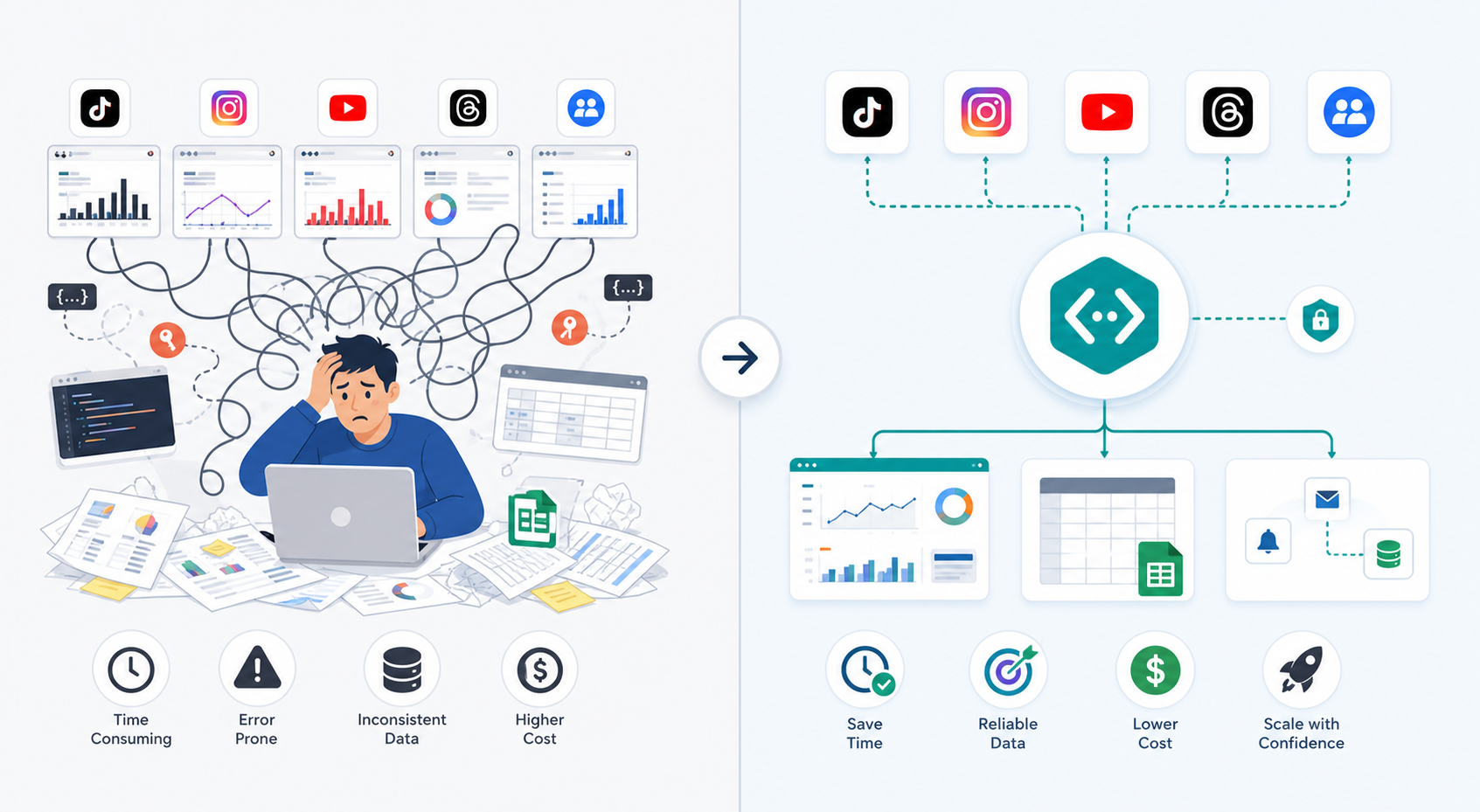
Problem 1: Every platform speaks its own dialect
You are not just collecting data. You are translating it. Every platform has different structures, different quirks, different limitations, and a different idea of what should be easy.
KeyAPI helps by giving you a more unified way to access and work with that data, which makes it easier to build products and reports that do not feel like five separate systems wearing the same coat.
Problem 2: Cross-platform reporting gets messy fast
This is where good intentions go to die.
A team starts with a simple plan: “Let’s compare performance across channels.” Then one platform counts things differently, another refreshes on a different rhythm, and someone ends up patching the whole thing together in a spreadsheet that should probably be studied by historians.
If that sounds familiar, read How to Build a Multi-Platform Social Media Dashboard with One API Layer. It is a good next step if your main goal is reporting.
Problem 3: Monitoring and automation become harder than they should be
When you want to track mentions, content shifts, or performance across multiple sources, platform-by-platform setups become annoying very quickly. The logic fragments. Maintenance grows. Confidence drops.
If your goal is monitoring, Unified Social Media API: How to Access TikTok, YouTube, Threads, and More in One Workflow is worth reading next because it shows where unified access becomes more practical than a pile of isolated connectors.
When should you use KeyAPI instead of direct platform APIs?
This is the useful question, because the answer is not “always.”
Use KeyAPI when you need cross-platform work
KeyAPI makes the most sense when your workflow depends on more than one source. If you are building dashboards, monitoring systems, competitive tracking tools, internal research layers, or AI-driven automations that pull from multiple platforms, a unified access layer saves time and future maintenance.
Use KeyAPI when speed matters
Sometimes the business problem is clear, but engineering time is not infinite. You need to move. You need something stable enough to build on without turning setup into a side quest with no ending.
That is a good fit for KeyAPI.
Direct platform APIs may still be fine when your scope is very narrow
If you only need one platform, one endpoint family, and one tightly scoped workflow, going direct may still make sense. There is nothing wrong with that. Not every job needs the Swiss Army knife. Sometimes you just need a spoon.
The trouble begins when the system grows and the “simple one-platform setup” quietly becomes a collection of five separate technical headaches.
What can you build with KeyAPI?
This is where the product becomes more concrete.
A cross-platform analytics dashboard
If you want one reporting layer instead of three disconnected ones, KeyAPI gives you a better starting point. For that angle, Social Media Analytics API: How to Build Cross-Platform Reporting That Actually Works pairs well with this page.
A monitoring or alerting workflow
You can use unified data access to power alerts, brand monitoring, competitor tracking, or content discovery workflows that would otherwise require a lot of platform-specific maintenance.
An internal research or ops tool
Not every useful system is customer-facing. Some of the best ones live quietly inside a team and save hours every week. KeyAPI is a good fit when your ops or research workflow depends on pulling social data regularly and turning it into something more usable.
AI agents and automation pipelines
If your workflows need fresh social signals, content inputs, or recurring updates, one source layer is simply easier to plug into an automation stack than half a dozen custom integrations.
What makes KeyAPI different from the usual “just connect everything yourself” approach?
Time, sanity, and maintenance debt.
Building everything directly can work. It can also become an expensive hobby. Every platform adds more docs, more exceptions, more update risk, and more field mapping. Suddenly the thing you meant to build is no longer the product. The integration layer has become the product.
KeyAPI helps move that burden down a level.
That does not mean you skip architecture thinking. It means you get to spend more of that thinking on your actual use case: the dashboard, the workflow, the automation, the research tool, the alerting layer, the system your users or team actually care about.
How should someone start with KeyAPI?
Start with the question you are trying to answer, not the feature you think sounds impressive.
If you need unified access
Begin with the platform coverage and workflow problem. Which sources do you need? What are you trying to build? What would become easier if those inputs were cleaner?
If you need reporting
Start with the dashboard or reporting use case. What are you comparing? How often? Who needs the output? Which current manual steps should disappear?
If you need monitoring or AI workflows
Start with the trigger logic. What content, mentions, or signals matter? How quickly do you need them? What should happen next once the data arrives?
That may sound obvious, but it saves a lot of waste. The teams that get value from an API are usually the ones that begin with a real workflow, not a vague feeling that “we should probably use more APIs.”
Final thought
KeyAPI is not trying to make social data magical. It is trying to make it less annoying.
If you are building across multiple social platforms, the real problem is usually not access in the abstract. It is the growing pile of tokens, schemas, edge cases, maintenance work, and reporting chaos that comes with doing everything one platform at a time.
KeyAPI gives you a cleaner starting point.
If you want to explore the broader product direction, start at KeyAPI.ai. If you are already thinking in terms of dashboards and reporting, read How to Build a Multi-Platform Social Media Dashboard with One API Layer. If your world is more about access and orchestration, continue with Unified Social Media API: How to Access TikTok, YouTube, Threads, and More in One Workflow.
FAQ
Is KeyAPI a social media API?
KeyAPI is better understood as a unified social media API layer. It helps you work with social platform data in one cleaner workflow instead of treating every platform as a separate engineering project.
Who should use KeyAPI?
KeyAPI is a strong fit for developers, data teams, automation builders, AI workflow teams, and businesses that need multi-platform social data for dashboards, monitoring, or reporting.
When is KeyAPI better than using direct platform APIs?
It is usually better when your workflow depends on multiple platforms, recurring reporting, monitoring, or automation. If your need is very narrow and limited to one platform, direct APIs may still be enough.
Can KeyAPI help with dashboards and reporting?
Yes. It is especially useful when you need to bring social data from multiple places into one dashboard, report, or internal system without rebuilding the data layer over and over.
What should I read after this page?
If you are focused on reporting, read Social Media Analytics API: How to Build Cross-Platform Reporting That Actually Works. If you are focused on unified access across platforms, read Unified Social Media API: How to Access TikTok, YouTube, Threads, and More in One Workflow.