What Can You Build With KeyAPI? 4 Practical Use Cases for Social Data Teams


Before anyone commits to a new API, they usually want a more useful answer than “it supports multiple platforms.” The real question is what that support turns into. Can it help build a dashboard that stops breaking every week? Can it feed alerts, reporting, or AI workflows without adding another messy layer of maintenance? That is the right way to evaluate KeyAPI. If you need the product definition first, read [What Is KeyAPI? A Unified Social Media API for Developers, Data Teams, and AI Workflows]. This article focuses on the outcome side: what teams actually build once a unified social media API is in place.
What people are usually trying to fix when they search KeyAPI
Nobody starts here because everything is calm.
Usually, something has already gone sideways. A dashboard project keeps getting delayed because every platform has its own structure. A reporting workflow still depends on exports and cleanup. A monitoring setup works for one source, then becomes weird the moment a second and third source join. An AI tool that looked clever in a demo starts hallucinating confidence because the input layer is inconsistent.
That is the real backdrop.
So when someone searches KeyAPI, the underlying question is often one of these:
Can this replace a pile of separate social integrations?
That is one of the strongest use cases. The more platforms involved, the more a unified data layer starts to matter.
If you are still deciding whether KeyAPI is worth using in the first place, read [KeyAPI vs Direct Platform APIs: Which One Makes Sense for Your Product?] before going deeper into implementation ideas.
Can this help me build something faster?
Yes, especially if the thing you are building depends on multi-platform data and you would rather spend time on the product itself than on platform-by-platform maintenance.
Can this make reporting or monitoring less fragile?
Also yes. Not magically, but meaningfully. A cleaner input layer usually leads to a calmer reporting layer.
Is this overkill for what I need?
Sometimes it is. That is worth saying early, because not every workflow needs a unified social media API. Some only need one narrow platform connection. That is fine too.
What Can You Actually Build With KeyAPI?
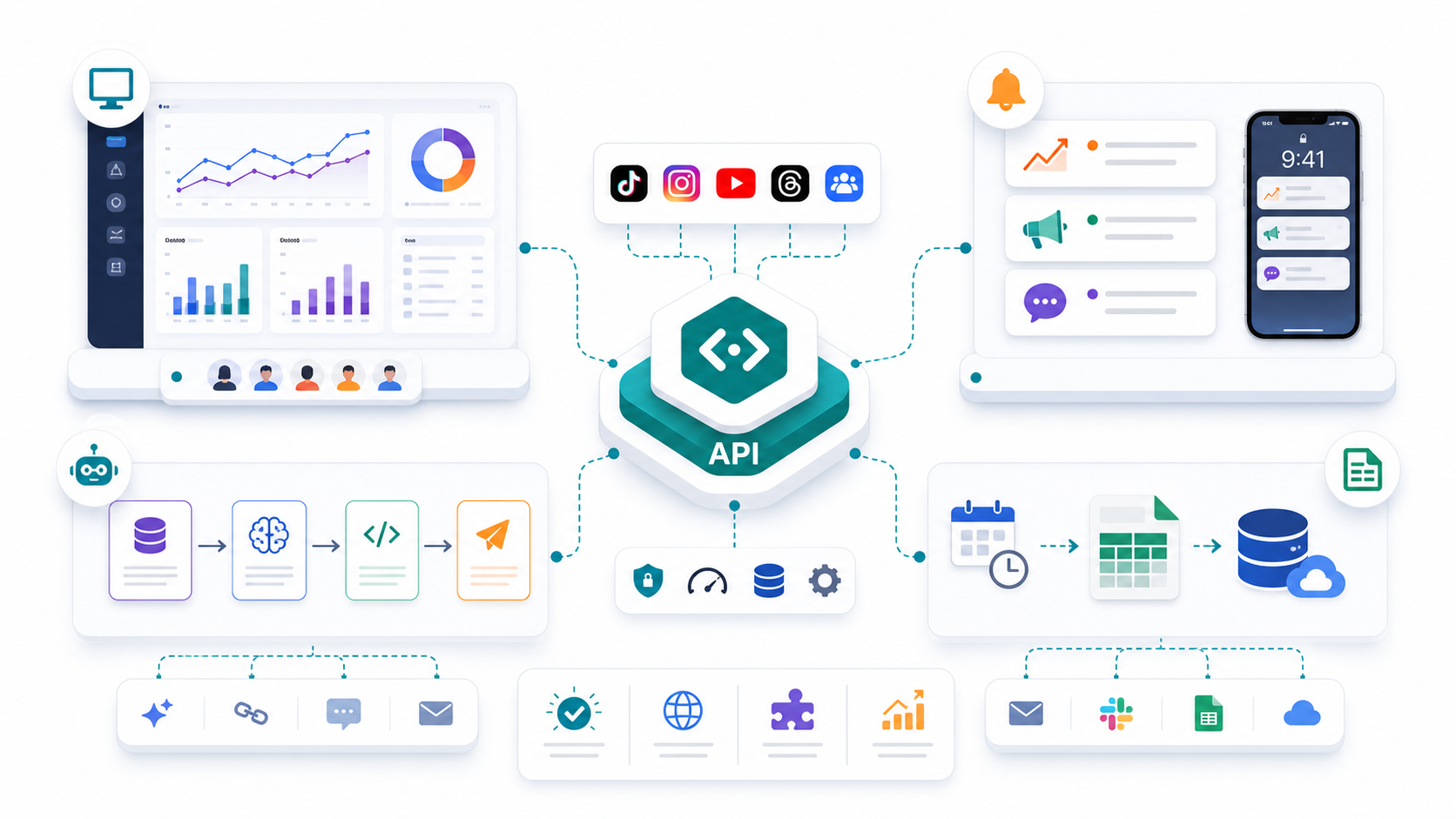
A lot of API pages stop at “supports multiple platforms,” which sounds useful until someone asks the obvious follow-up question: useful for what?
That is the part that matters.
KeyAPI becomes much easier to evaluate when you stop looking at it as a list of integrations and start looking at it as a foundation for specific workflows. In practice, most teams use it for one of four jobs: building a cross-platform dashboard, running brand monitoring and alerts, creating a recurring reporting pipeline, or feeding structured data into an AI workflow.
If you have not yet decided whether a unified layer makes more sense than connecting every platform separately, read KeyAPI vs Direct Platform APIs: Which One Makes Sense for Your Product? first. If you want the product-level overview, go back to What Is KeyAPI? A Unified Social Media API for Developers, Data Teams, and AI Workflows.
Use Case 1: Cross-Platform Dashboard
A dashboard is often the first serious reason teams start looking for a unified social media API.
Who needs it
This use case fits:
product teams building customer-facing analytics tools
internal data teams building leadership dashboards
agencies managing reporting across several channels
growth teams that need one view across TikTok, Instagram, YouTube, Threads, and other platforms
What problem it fixes
The real problem is not “we need charts.” The real problem is that platform-by-platform reporting becomes fragile very quickly.
One platform labels metrics one way, another structures the same idea differently, and a third refreshes on its own schedule. Even if the dashboard looks clean on the surface, the data layer underneath often turns into a patchwork of exceptions. That usually leads to delayed releases, messy comparisons, and reports that nobody fully trusts.
Why KeyAPI helps
KeyAPI helps because it gives the dashboard a cleaner starting point.
Instead of stitching together separate integrations for every platform, you work from one more unified access layer. That does not remove all reporting work, but it reduces the amount of repeated logic your team has to build and maintain before the dashboard becomes useful.
If dashboard-building is your main priority, How to Build a Multi-Platform Social Media Dashboard with One API Layer should be one of the next pages you visit.
When not to use it
This is probably not your first move if:
you only need one platform
you only need a simple manual export once in a while
the dashboard is still a very small proof of concept with no real reporting depth yet
In those cases, direct platform access may still be enough.
Use Case 2: Brand Monitoring and Alerts
Some teams do not need a dashboard first. They need to know when something changes.
Who needs it
This use case fits:
brand teams tracking mentions and sentiment shifts
competitive intelligence teams watching other accounts or campaigns
operations teams that need alert-based workflows
research teams tracking trends across several social platforms
What problem it fixes
Brand monitoring breaks down when it relies on too many disconnected checks.
At first, it looks manageable: a few manual searches, a few dashboards, maybe one alerting tool. Then more platforms matter, more tracked terms appear, and the system starts depending on too many separate sources. Coverage becomes uneven, alert logic gets messy, and the team spends more time checking systems than reacting to the signals.
Why KeyAPI helps
KeyAPI helps because it gives monitoring workflows one cleaner input layer.
That matters when you want to run repeated checks, compare signals across sources, and build alerts that do not depend on each platform being handled in a completely different way. It is especially useful when monitoring is not just a side project, but part of a recurring workflow that needs to stay reliable.
If your main interest is access across sources and not just dashboards, Unified Social Media API: How to Access TikTok, YouTube, Threads, and More in One Workflow is the best supporting article to link from here.
When not to use it
This is probably not the best first step if:
your monitoring scope is limited to one platform
the team still handles everything manually and the volume is low
you do not yet have a clear idea of what should trigger an alert or why
A unified API makes a weak monitoring strategy easier to automate, but it does not create the strategy for you.
Use Case 3: Recurring Reporting Pipeline
This is the least glamorous use case and one of the most valuable.
Who needs it
This use case fits:
marketing teams sending weekly or monthly performance reports
agencies preparing recurring client reports
operations teams syncing social data into internal BI or warehouse workflows
data teams trying to reduce manual exports and spreadsheet cleanup
What problem it fixes
Manual reporting gets expensive in boring ways.
A one-off report is annoying. A recurring report becomes a process problem. Someone has to export, clean, rename, compare, and reformat data over and over again. Even when the report looks polished at the end, the workflow behind it often wastes hours every week and introduces mistakes the team stops noticing because they have become normal.
Why KeyAPI helps
KeyAPI helps by making the reporting layer easier to standardize.
Instead of rebuilding the same cross-platform collection process every reporting cycle, teams can use one data layer as the starting point for dashboards, spreadsheets, or warehouse syncs. The benefit is not just that it saves time. It also creates a reporting workflow people are more likely to trust and keep using.
This is also where Social Media Analytics API: How to Build Cross-Platform Reporting That Actually Works becomes a strong internal link, because it goes deeper into how a stable reporting workflow should be structured.
When not to use it
You may not need this yet if:
reporting is still ad hoc rather than recurring
the team only needs one or two basic metrics
the cost of setup is still higher than the cost of the current manual process
That said, once reporting becomes regular, this is often the use case that reveals how expensive “just export it for now” really is.
Use Case 4: AI Workflow or Agent Input Layer
This is where a lot of teams get interested, and also where messy data causes the fastest disappointment.
Who needs it
This use case fits:
teams building AI agents that use social signals
internal search or enrichment systems
workflow builders using automation platforms
products that need fresh multi-platform social data as structured input
What problem it fixes
AI systems are very good at moving fast with bad input.
If the workflow depends on several social sources but every source arrives in a different structure, with different field logic and refresh behavior, your team ends up spending too much time translating data before the AI layer can do anything useful. That slows down experiments and makes outputs less reliable.
Why KeyAPI helps
KeyAPI helps because it makes the input layer more consistent.
That consistency matters whether the data is feeding an agent, an enrichment flow, a content analysis pipeline, or an internal assistant. The point is not that “AI likes APIs.” The point is that cleaner, more repeatable data access makes AI workflows easier to build and less annoying to maintain.
When not to use it
This may be premature if:
the AI workflow is still hypothetical
your team has not defined what data the agent actually needs
the use case only touches one platform and one narrow dataset
you are still validating whether the workflow is worth building at all
A unified data layer is powerful, but only when the workflow around it is real.
Which Use Case Usually Comes First?
In practice, most teams do not start with all four.
They usually start with the one pain point that has already become too expensive to ignore:
a dashboard that keeps getting delayed
a monitoring workflow that is too fragmented
a reporting process that eats hours every week
an AI experiment that needs cleaner inputs than the current stack can provide
That is the best place to start with KeyAPI too.
Pick the workflow that already hurts. Validate that one first. Then expand into the second and third use cases once the shared data layer begins proving its value.
Final Takeaway
KeyAPI is not useful because it is “multi-platform” in the abstract. It is useful because it helps teams build specific things with less repeated integration work.
That usually means one of four outcomes:
a more stable dashboard
a more scalable monitoring workflow
a reporting pipeline that stops depending on manual cleanup
an AI workflow that starts from cleaner inputs
If you are still deciding whether KeyAPI is the right architectural choice, go next to KeyAPI vs Direct Platform APIs: Which One Makes Sense for Your Product?. If you need the broader product definition, return to What Is KeyAPI? A Unified Social Media API for Developers, Data Teams, and AI Workflows.
What are we actually building?
A dashboard, an alerting system, a reporting workflow, an internal data layer, and an AI pipeline may all use social data, but they do not ask for the same structure. Be clear before you choose.
Which platforms matter in the next six months?
Do not buy for an imaginary future. But do not design as if your current two-platform world will stay that way forever either.
What manual work should disappear?
This is one of the best evaluation filters. If KeyAPI does not remove real repeated effort from your current workflow, the value is probably not strong enough yet.
Who owns the workflow after setup?
If everyone assumes someone else will understand the data layer later, the future has already filed a complaint.
Where does the data need to go next?
Into a dashboard? A spreadsheet? A warehouse? An agent? A monitoring rule? The answer affects whether a unified layer is just convenient or genuinely strategic.
How to start without making it weird
The cleanest way to adopt KeyAPI is not to boil the ocean.
Start with one output that matters
Pick the workflow that already hurts. A dashboard. A report. A monitoring system. An AI pipeline. Solve a real problem first.
Add platforms only when they improve the workflow
More coverage is not always better on day one. Add what the use case actually needs.
Validate the output, not just the connection
A successful API setup is not “we fetched data.” It is “the dashboard is useful,” “the report is cleaner,” or “the alert catches what we care about.”
Use internal links and product paths intentionally
If this article is supporting your main site signals, it should send users and Google toward the right places:
homepage: KeyAPI
access layer article: Unified Social Media API: How to Access TikTok, YouTube, Threads, and More in One Workflow
dashboard article: How to Build a Multi-Platform Social Media Dashboard with One API Layer
reporting article: Social Media Analytics API: How to Build Cross-Platform Reporting That Actually Works
FAQ
What is KeyAPI best used for?
KeyAPI is best used for multi-platform social data workflows such as dashboards, reporting, monitoring, alerts, automation, and AI-powered systems.
Is KeyAPI only for developers?
No. Developers often lead setup, but the value usually extends to data, operations, research, marketing, and product teams that depend on cleaner social data.
When is KeyAPI better than direct platform APIs?
It is usually better when your workflow spans multiple platforms or feeds multiple outputs like dashboards, alerts, and reporting systems.
Can KeyAPI help with AI workflows?
Yes. It is especially useful when AI tools or agents need more consistent social data inputs across more than one platform.
Should I use KeyAPI for a single-platform project?
Maybe not. If the use case is very narrow and likely to stay that way, direct access can still be the simpler choice.