Official APIs vs Unified Social Media API: What Should You Use for Influencer Analytics in 2026?


In March 2026, a small SaaS team I spoke with was building an influencer analytics dashboard.
The first version looked simple on paper.
They wanted to let users paste a creator profile, pull recent posts, calculate engagement rate, and compare creators across TikTok, Instagram, and YouTube.
The product manager wrote the first plan in one line:
Connect TikTok API, Instagram API, and YouTube API.
That sounded reasonable.
By the second week, the team had a different problem.
YouTube was stable but quota planning became annoying. Instagram required more permission thinking than expected. TikTok data was harder to standardize across creator profiles and videos. Even when the data came back, the fields did not match.
By the fourth week, the dashboard was still not the hard part.
The hard part was the data layer.
That is the real decision most teams face in 2026:
Should you build directly on official APIs, or should you use a unified social media API?
If you are still learning the basics of APIs, start here first:
What Is an API? Understanding Social Media APIs in 2026
Official APIs vs Unified Social Media API: The Core Difference
Official APIs and unified APIs solve different problems.
They are not the same tool with different names.
What Official APIs Are
Official APIs are provided by each platform.
For example:
TikTok API Instagram Graph API YouTube Data API X API Reddit API LinkedIn API
If your product only needs one platform, official APIs can be a good starting point.
You work directly with the platform’s rules, permissions, rate limits, and data structure.
What a Unified Social Media API Is
A unified social media API gives your product one access layer for multiple platforms.
Instead of building separate integrations for every platform, your application connects once.
Your product ↓ Unified API layer ↓ TikTok / Instagram / YouTube / X / Reddit / more
The goal is not only to fetch data.
The goal is to make data easier to use inside your product.
For influencer analytics, that usually means cleaner creator profiles, recent posts, engagement fields, and normalized metrics across platforms.
You can see the KeyAPI platform here:
KeyAPI.ai
When Official APIs Are the Better Choice
Official APIs are not wrong.
In some cases, they are the cleanest option.
Use Official APIs for Single-Platform Products
If your product only works with YouTube, the YouTube Data API may be enough.
For example:
YouTube channel tracker YouTube comment analysis tool YouTube Shorts reporting dashboard YouTube creator CRM
In this case, using one official API keeps the system focused.
You do not need a multi-platform data layer if the product does not compare multiple platforms.
Use Official APIs for Owned Account Data
Official APIs are often strongest when the user owns the account and grants permission.
For example:
a creator connects their own YouTube channel a brand connects its own Instagram business account a seller connects its own shop account an advertiser connects its own campaign account
This is a good fit for permission-based dashboards.
The user logs in, authorizes access, and your product receives approved data.
Use Official APIs for Platform-Specific Features
Sometimes you need one feature that only the official API supports.
For example:
account management ad account reporting owned channel analytics publishing workflows private account insights
If your product depends on those platform-specific features, official APIs may be required.
Where Official APIs Start to Break for Influencer Analytics
The problem usually appears when the product becomes cross-platform.
Influencer analytics almost always becomes cross-platform.
A brand rarely asks:
Can you show me only YouTube creators?
More often, the user asks:
Which creators should we pay across TikTok, Instagram, and YouTube?
That changes the whole system.
Problem 1: TikTok, Instagram, and YouTube Do Not Use the Same Data Model
This is the first thing developers notice.
The same business question becomes three different technical problems.
How many people follow this creator? How many people viewed this post? How many people commented? How often does this creator publish? How strong is recent engagement?
Each platform answers these questions differently.
A simple creator object may become three separate schemas.
json
{ "instagram": { "followers_count": 84000, "media_count": 312 }, "youtube": { "subscriberCount": "84000", "videoCount": "312" }, "tiktok": { "follower_count": 84000, "video_count": 312 } }
The numbers may describe similar ideas, but the structure is different.
That means your team has to build a normalization layer before users can compare creators.
Problem 2: Rate Limits Become a Product Problem
Rate limits sound like a backend issue.
In influencer analytics, they quickly become a product issue.
If your user uploads 500 creator profiles and expects a report in 10 minutes, your system has to collect a lot of data quickly.
That may include:
creator profile data latest posts video views likes comments shares publish dates hashtags
With direct official API integrations, each platform has separate limits and rules.
Your dashboard may need to slow down, queue requests, retry failed jobs, or show incomplete data.
The user does not care which platform caused the delay.
They only see that the report is not ready.
Problem 3: Permissions Slow Down Product Testing
In April 2026, this is still one of the biggest issues for small teams.
They want to validate a product idea quickly, but official API permissions can slow them down.
For a new influencer analytics product, the first goal is usually simple:
Can users find better creators with this workflow?
But before testing that, the team may get stuck on app review, permission scopes, account requirements, or limited endpoint access.
That slows down learning.
Problem 4: Maintenance Becomes Invisible Work
The first API integration feels like progress.
The sixth integration feels like maintenance.
Each platform can change fields, limits, permissions, response formats, or behavior.
When that happens, your team has to fix the integration before users notice broken data.
This is why many dashboards look easy from the outside but become expensive to operate after launch.
If you are building the dashboard layer, read this guide:
How to Build a Multi-Platform Influencer Analytics Dashboard
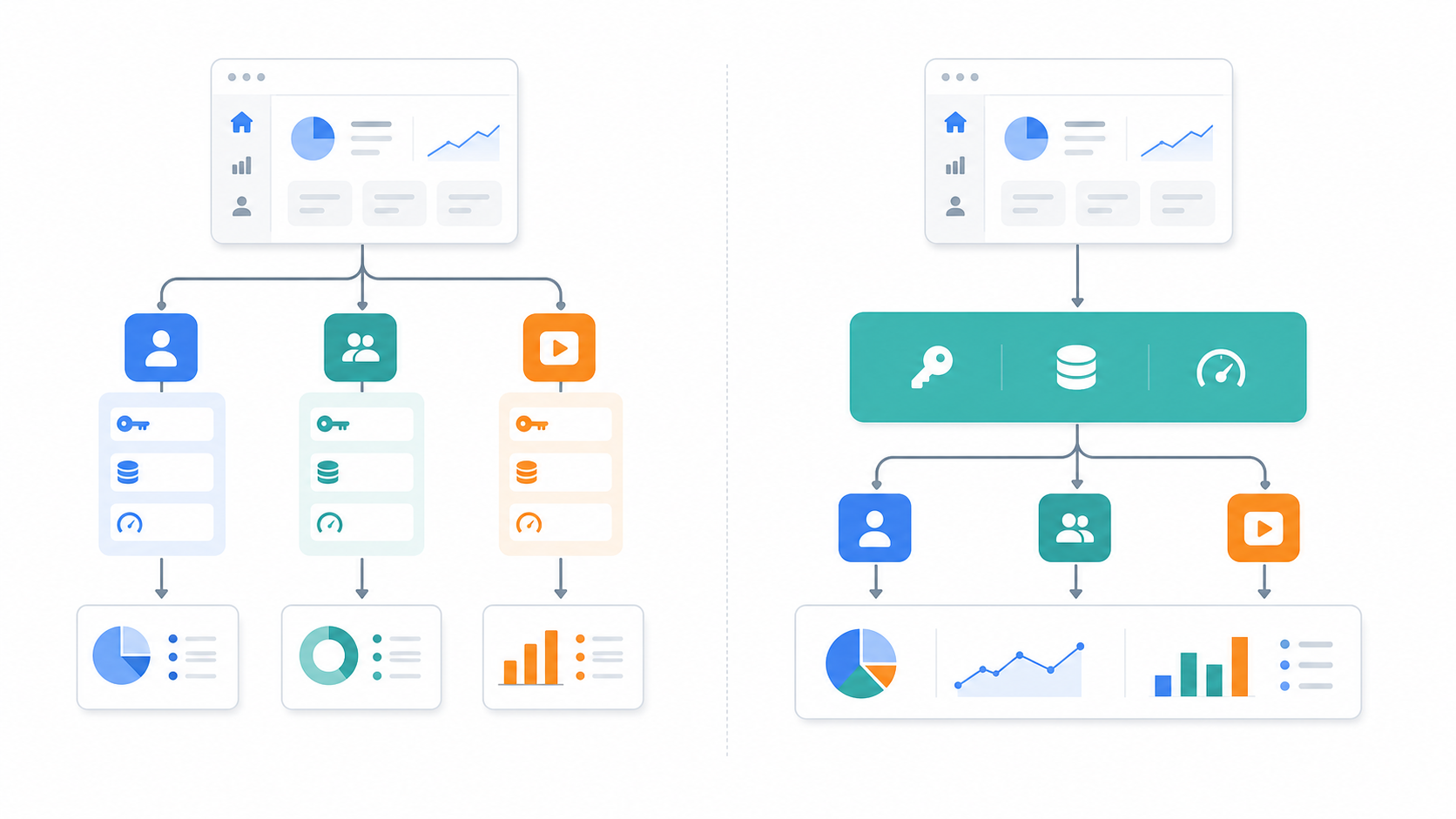
Unified Social Media API vs Official APIs for Influencer Analytics
For influencer analytics, the better choice depends on what the user expects your product to do.
If Users Only Need One Platform
Official APIs can work well.
A YouTube-only tool can use YouTube directly. An Instagram-owned-account reporting tool can use Meta’s official flows.
There is no need to add extra complexity if the product does not need cross-platform comparison.
If Users Need Cross-Platform Creator Comparison
A unified social media API is usually a better fit.
Influencer analytics users want answers like:
Which creator has stronger recent reach? Which creator has better comment quality? Which creator is more consistent? Which platform performs best for this creator? Which creator should we contact first?
Those questions require normalized data.
Without normalization, your team is not building analytics yet.
You are still cleaning platform responses.
If Users Need Fast Creator Vetting
A unified API also helps when users need to vet many creators before paying them.
For example, a brand may want to compare 200 creators before launching a campaign in June 2026.
The workflow may look like this:
Day 1: collect creator handles Day 2: pull recent posts and metrics Day 3: calculate engagement and median views Day 4: remove weak creators Day 5: contact the final shortlist
That process is hard to run manually.
It is also hard to run if every platform has a separate data structure.
For the full vetting workflow, read:
How to Vet Influencers with Social Media APIs Before You Pay Them
Official APIs vs Unified API: Practical Comparison
Question | Official APIs | Unified Social Media API |
|---|---|---|
Do you only need one platform? | Usually a good fit | May be more than needed |
Do you compare TikTok, Instagram, and YouTube? | Requires more engineering | Better fit |
Do you need owned account data? | Often better | Depends on use case |
Do you need fast MVP testing? | Can be slowed by reviews | Usually faster to start |
Do you need normalized creator metrics? | You build it yourself | Often built into workflow |
Do you need long-term maintenance control? | More control, more work | Less integration burden |
Do you need platform-specific features? | Better fit | Depends on coverage |
How to Decide: A Simple 2026 Checklist
Before choosing official APIs or a unified social media API, answer these questions.
How Many Platforms Do You Need in the First 90 Days?
If the answer is one, start with the official API.
If the answer is three or more, plan for a unified data layer early.
Most teams underestimate this.
They say they only need TikTok first. Two weeks later, users ask for Instagram. One month later, they ask for YouTube Shorts.
By then, the original data model may already be too narrow.
Are You Tracking Owned Accounts or Public Creator Data?
Owned account analytics and public creator research are different workflows.
Official APIs are often stronger for owned account reporting.
Unified APIs are often more useful when your product needs broad creator discovery, competitor research, or public-facing creator performance data.
Do You Need Raw Data or Decisions?
If your product only displays raw metrics, direct APIs may be enough.
If your product helps users decide who to contact, who to pay, or who to remove from a shortlist, you need more than raw data.
You need consistent metrics.
For engagement analysis, read:
Influencer Engagement Rate API: Follower Count vs Real Creator Performance
Who Will Maintain the Integrations Six Months Later?
This is the question teams avoid.
In January, building integrations feels like product work.
By July, fixing broken integrations feels like operational drag.
If your team is small, this matters.
A unified API can reduce the number of platform-specific problems your team has to manage directly.
How KeyAPI Fits Into This Decision
KeyAPI.ai is built for teams that need structured social media data across multiple platforms.
For influencer analytics, the workflow usually looks like this:
Creator handle or profile URL ↓ KeyAPI ↓ Creator profile and post data ↓ Normalized metrics ↓ Engagement analysis ↓ Influencer dashboard or AI workflow
Instead of building and maintaining every platform integration yourself, you can focus on the parts users actually care about:
creator scoring campaign planning engagement analysis shortlist building dashboard design AI agent workflows reporting
Useful KeyAPI links:
KeyAPI.ai
KeyAPI Docs
TikTok API by KeyAPI
YouTube API by KeyAPI
Common Mistakes When Choosing an API Strategy
Mistake 1: Choosing Official APIs Because They Look Free
Free API access does not mean free implementation.
You still pay with engineering time.
That includes:
reading documentation handling permissions building retries normalizing fields monitoring failures updating broken integrations
For a one-platform tool, that may be fine.
For a multi-platform influencer analytics product, the cost grows quickly.
Mistake 2: Designing the Dashboard Before the Data Model
A clean dashboard cannot fix inconsistent data.
Before designing charts, define the metrics:
followers views likes comments shares median views engagement by views engagement by followers posting frequency
Then decide how each platform maps into those fields.
Mistake 3: Treating TikTok, Instagram, and YouTube the Same
Users want simple comparisons.
But your system should not pretend every platform behaves the same.
TikTok is fast and volatile.
Instagram depends heavily on format, niche, and comments.
YouTube can be slower, but content may keep collecting views for longer.
A good analytics product standardizes the data without ignoring platform differences.
Mistake 4: Ignoring Refresh Frequency
Not every creator needs real-time updates.
A creator going viral today may need frequent refreshes.
A stable creator with predictable performance may only need periodic updates.
A practical system separates:
hot creators active campaign creators stable tracked creators archived creators
That saves cost and improves reliability.
Mistake 5: Thinking API Access Is the Whole Product
API access is only the starting point.
Users do not pay because your product can fetch JSON.
They pay because your product helps them make a better decision.
For influencer analytics, that decision is usually:
Which creator should we trust with campaign budget?
Recommended API Strategy for Influencer Analytics
For most influencer analytics products in 2026, I would use this approach.
Start with the User Decision
Do not start with the API.
Start with the decision your user needs to make.
For example:
Should we contact this creator? Should we pay this creator? Should we remove this creator from the shortlist? Should we increase budget for this creator?
Then work backward to the data.
Define the Metrics Before Choosing the API
For a useful creator analytics product, I would define these fields first:
creator profile platform follower or subscriber count recent posts views likes comments shares publish date median views engagement rate posting frequency comment quality
Once the metrics are clear, the API choice becomes easier.
Use Official APIs When the Product Is Narrow
If the product is platform-specific, official APIs are often enough.
Examples:
YouTube-only creator tracker Instagram-owned-account reporting TikTok shop seller analytics
Use a Unified API When the Product Is Cross-Platform
If the product compares creators across platforms, use a unified API or build your own unified layer.
The key is not the vendor.
The key is the architecture.
Your product needs one consistent way to think about creator data.
FAQ
What is the difference between official APIs and a unified social media API?
Official APIs are provided by individual platforms such as TikTok, Instagram, and YouTube. A unified social media API gives developers one access layer for multiple platforms, making it easier to collect and normalize data across sources.
Are official APIs better than unified APIs?
Official APIs are better for single-platform products, owned account data, and platform-specific features. Unified APIs are usually better for cross-platform analytics, creator comparison, and faster product development.
Why are official APIs difficult for influencer analytics?
Influencer analytics often needs data from multiple platforms. Each platform has different permissions, limits, field names, response structures, and update behavior. That makes cross-platform comparison harder.
When should I use a unified social media API?
Use a unified social media API when your product needs TikTok, Instagram, YouTube, and other platform data in one workflow, especially for influencer analytics, creator vetting, engagement tracking, dashboards, or AI agents.
Can I build an influencer analytics dashboard with official APIs?
Yes. But you will need to manage authentication, permissions, rate limits, retries, data normalization, caching, and ongoing maintenance for each platform.
How does KeyAPI help with influencer analytics?
KeyAPI helps developers access structured social media data across multiple platforms through one API layer. This makes it easier to build creator scoring, engagement analysis, influencer dashboards, and AI workflows.
Should I choose official APIs or KeyAPI for my product?
Choose official APIs if your product is narrow, single-platform, or depends on owned account permissions. Consider KeyAPI if your product needs cross-platform social media data, normalized creator metrics, and faster development for influencer analytics.