YouTube Get Video Information API (2026): Extract Full Video Data

YouTube hosts over 800 million videos — and every one of them sits on top of a rich layer of structured data. Titles, descriptions, view counts, like counts, comment counts, channel information, tags, thumbnails, duration, publish date, playback formats, and more. For developers building content intelligence tools, AI pipelines, competitive analysis platforms, or creator analytics dashboards, accessing that data programmatically is not optional — it's the foundation.
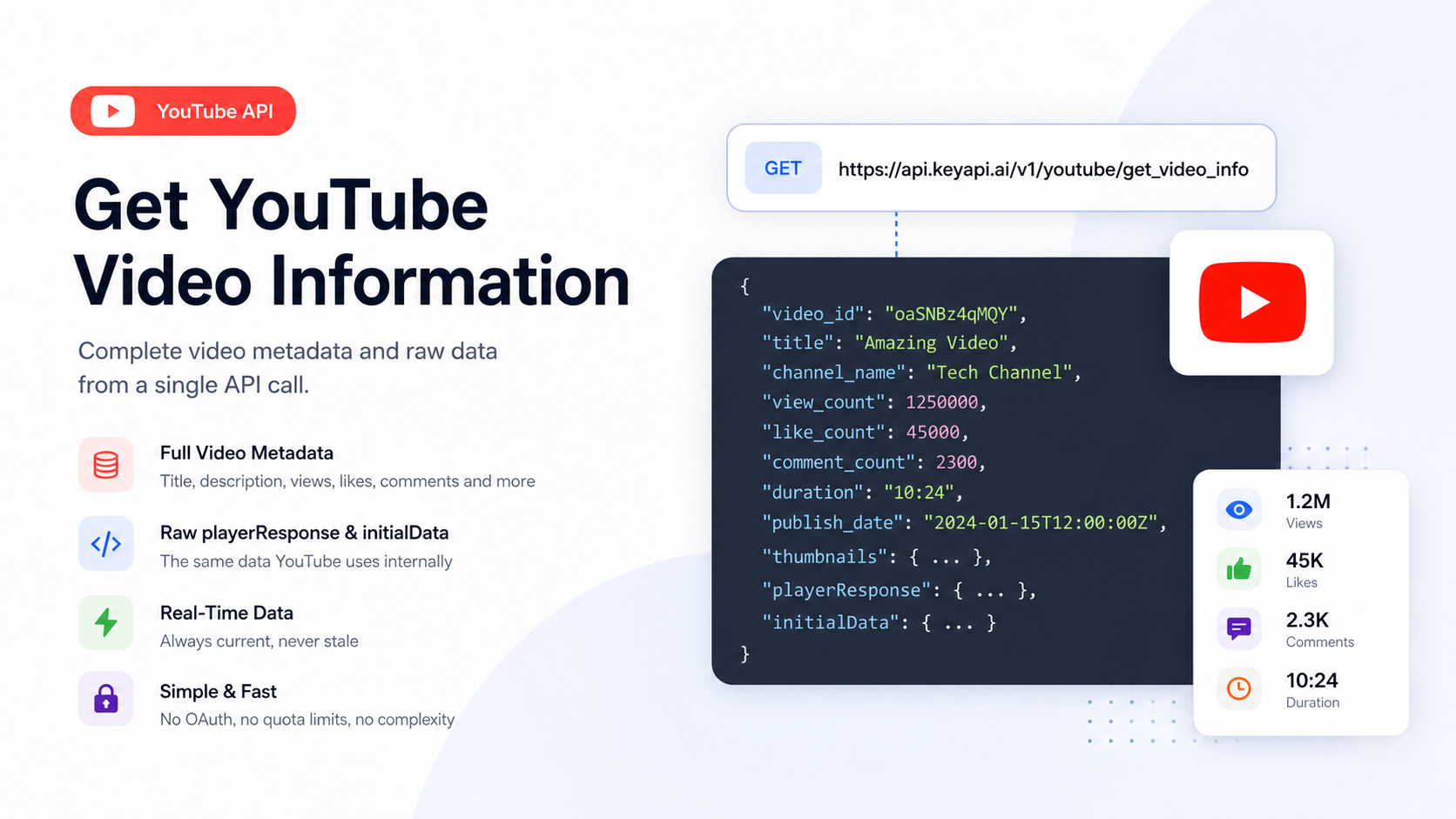
The YouTube Get Video Information API is the endpoint that makes this possible. It lets you query any public YouTube video by its video ID and receive a complete, structured JSON response containing everything YouTube knows about that video — including the raw playerResponse and initialData structures that underpin YouTube's own interface.
This guide covers what the YouTube Get Video Information API is, what data it returns, why the official YouTube Data API v3 falls short for video metadata use cases, how KeyAPI's dedicated endpoint works, how to make your first API call, and the real-world use cases this data powers.
What Is the YouTube Get Video Information API?
The YouTube Get Video Information API is a REST endpoint that accepts a YouTube video ID as input and returns detailed metadata and raw data for that video in a structured JSON format.
In practical terms, it answers questions like:
What is the title, description, and publish date of this video?
How many views, likes, and comments does it have?
What channel published it, and what are the channel's stats?
What tags and category is the video associated with?
What thumbnail URLs are available at different resolutions?
What is the video's duration?
What playback formats and quality levels are available?
What does YouTube's internal playerResponse data structure contain for this video?
All of this is returned from a single API call — no OAuth flow, no quota juggling, no Google Cloud project required.
What's a Video ID?
A YouTube video ID is the unique identifier embedded in every YouTube URL. For example, in the URL:
https://www.youtube.com/watch?v=oaSNBz4qMQY
The video ID is oaSNBz4qMQY — the string after ?v=. It's always 11 characters. For Shorts and other YouTube URL formats, the same ID appears after /shorts/ or in the share link.
Every YouTube Get Video Information API call requires exactly one video ID. You can retrieve it from any YouTube URL with a simple string parse.
Why the Official YouTube Data API v3 Falls Short
The official YouTube Data API v3 is well-documented and returns reliable data. But for any serious video data operation, it runs into several hard limitations that make it impractical at scale.
The Quota Problem
Every API call to the official YouTube Data API consumes "quota units" from a daily budget of 10,000 units. A basic video metadata request (videos.list) costs 1 unit per video ID — which sounds generous until you look at the practical limits:
Fetching metadata for 10,000 videos per day uses your entire quota
A search request costs 100 units — meaning you can run only 100 search queries per day
Any application that combines video lookups with search, comments, or channel data hits the ceiling fast
Requesting a quota increase requires a formal application to Google with uncertain approval timelines
For teams processing hundreds or thousands of videos per day — for AI training, competitive research, or content intelligence — the quota is a ceiling, not a speed bump.
OAuth Complexity for Public Data
The official API requires setting up a Google Cloud project, enabling the YouTube Data API v3, generating and securing API credentials, and managing OAuth 2.0 flows even for purely public data. For teams that simply need to read public video metadata, this is significant unnecessary overhead.
Limited Raw Data Access
The official API returns a curated subset of video metadata. It does not expose the raw playerResponse and initialData structures that contain the complete data YouTube uses internally — adaptive streaming manifests, subtitle track information, format availability, player configuration data, and more. Applications that need this deeper data have no official path to access it.
No Real-Time Signal Data
The official API is designed for structured queries, not real-time signals. Engagement velocity, trending context, and time-sensitive data points are not easily accessible through the official endpoints.
These are exactly the gaps that KeyAPI's YouTube Get Video Information API was built to fill.
KeyAPI's YouTube Get Video Information Endpoint
KeyAPI provides a dedicated Get Video Information endpoint as part of its broader YouTube API — a suite of 17+ endpoints covering video, channel, and search data.
Endpoint
GET https://api.keyapi.ai/v1/youtube/get_video_info
Parameters
Parameter | Type | Required | Description |
video_id | string | ✅ Required | The YouTube video ID (e.g., oaSNBz4qMQY) |
language_code | string | Optional | Language preference for returned data. Options: zh-CN, en-US, ja-JP, ko-KR, etc. |
need_format | boolean | Optional | When true, returns cleaned and formatted data instead of raw response |
Authentication
Pass your API key in the Authorization header:
Authorization: Bearer YOUR_API_KEY
Cost
Most KeyAPI endpoints, including Get Video Information, cost 1 credit per request. Credits are purchased on a pay-as-you-go basis and never expire. Sign up for 100 free API credits — no credit card required.
How to Make Your First API Call
Step 1: Get Your API Key
Register at keyapi.ai. You'll receive 100 free credits immediately. No credit card required.
Step 2: Find Your Video ID
Extract the video ID from any YouTube URL. For https://www.youtube.com/watch?v=oaSNBz4qMQY, the video ID is oaSNBz4qMQY.
Step 3: Make the Request
Using cURL:
bash
curl -X GET "https://api.keyapi.ai/v1/youtube/get_video_info?video_id=oaSNBz4qMQY" \
-H "Authorization: Bearer YOUR_API_KEY"
Using Python (requests):
python
import requests
url = "https://api.keyapi.ai/v1/youtube/get_video_info"
params = {
"video_id": "oaSNBz4qMQY"
}
headers = {
"Authorization": "Bearer YOUR_API_KEY"
}
response = requests.get(url, params=params, headers=headers)
data = response.json()
# Access video metadata
video = data["data"]
print(f"Title: {video['title']}")
print(f"Views: {video['view_count']}")
print(f"Likes: {video['like_count']}")
print(f"Duration: {video['duration']}")
print(f"Channel: {video['channel_name']}")
Using Node.js (fetch):
javascript
const videoId = "oaSNBz4qMQY";
const response = await fetch(
`https://api.keyapi.ai/v1/youtube/get_video_info?video_id=${videoId}`,
{
headers: {
"Authorization": "Bearer YOUR_API_KEY"
}
}
);
const data = await response.json();
const video = data.data;
console.log(`Title: ${video.title}`);
console.log(`Views: ${video.view_count}`);
console.log(`Published: ${video.publish_date}`);
Step 4: Use the need_format Parameter
By default, the endpoint returns the full raw response including playerResponse and initialData. If your application only needs clean, structured metadata, pass need_format=true to receive a formatted, simplified response:
bash
curl -X GET "https://api.keyapi.ai/v1/youtube/get_video_info?video_id=oaSNBz4qMQY&need_format=true" \
-H "Authorization: Bearer YOUR_API_KEY"
When to use need_format=true: Analytics dashboards, content management systems, and reporting tools that only need clean metadata fields — title, views, likes, duration, channel name, thumbnails, publish date.
When to use the raw response (default): AI training pipelines, applications that need adaptive streaming data, tools that need subtitle track info, or any use case that requires the complete data YouTube serves internally.
Step 5: Use the language_code Parameter
The language_code parameter controls the language preference for returned content — particularly useful for retrieving localized video titles and descriptions, or for applications serving non-English audiences:
bash
# Japanese language preference
curl -X GET "https://api.keyapi.ai/v1/youtube/get_video_info?video_id=oaSNBz4qMQY&language_code=ja-JP" \
-H "Authorization: Bearer YOUR_API_KEY"
# Simplified Chinese
curl -X GET "https://api.keyapi.ai/v1/youtube/get_video_info?video_id=oaSNBz4qMQY&language_code=zh-CN" \
-H "Authorization: Bearer YOUR_API_KEY"
What Data the Endpoint Returns
The YouTube Get Video Information API returns the full raw data from YouTube's playerResponse and initialData — the same data structures YouTube's own interface is built on. Here's what you can access:
Core Video Metadata
Field | Description |
video_id | The unique YouTube video identifier |
title | Video title |
description | Full video description |
publish_date | Upload date and time |
duration | Video length (in seconds and formatted) |
category | YouTube content category |
tags | Creator-defined video tags |
is_live | Whether this is a live or premiere stream |
age_restricted | Whether age restriction is applied |
Engagement Metrics
Field | Description |
view_count | Total view count |
like_count | Total like count |
comment_count | Total comment count |
is_comments_disabled | Whether comments are turned off |
Channel Information
Field | Description |
channel_id | The publishing channel's ID |
channel_name | Channel display name |
channel_url | Full channel URL |
channel_subscriber_count | Subscriber count (if public) |
channel_thumbnail | Channel avatar image URL |
Thumbnail URLs
Multiple thumbnail resolutions are returned — default, medium quality (mqdefault), high quality (hqdefault), standard definition (sddefault), and maximum resolution (maxresdefault) — so you can select the right size for your use case without additional requests.
Raw playerResponse Data
The playerResponse object contains YouTube's full internal video data structure, including adaptive streaming format manifests (separate audio and video streams at multiple quality levels), DASH and HLS manifest URLs, subtitle and caption track information, player configuration and feature flags, and microformat data used for SEO and embedding.
This raw data is what separates KeyAPI's Get Video Information endpoint from simpler metadata-only APIs. Applications that need to go beyond surface-level metadata — building video processing pipelines, subtitle extraction tools, or AI applications that need the full data layer — can access everything from a single call.
Processing the Response at Scale
For applications that process many videos, here is a pattern for batch retrieval with rate-aware execution:
python
import requests
import time
API_KEY = "YOUR_API_KEY"
BASE_URL = "https://api.keyapi.ai/v1/youtube/get_video_info"
def get_video_info(video_id, formatted=False):
params = {"video_id": video_id}
if formatted:
params["need_format"] = "true"
headers = {"Authorization": f"Bearer {API_KEY}"}
response = requests.get(BASE_URL, params=params, headers=headers)
response.raise_for_status()
return response.json()["data"]
def batch_get_video_info(video_ids, delay=0.2):
results = {}
for video_id in video_ids:
try:
results[video_id] = get_video_info(video_id, formatted=True)
print(f"✓ {video_id}: {results[video_id]['title']}")
except Exception as e:
print(f"✗ {video_id}: {e}")
results[video_id] = None
time.sleep(delay) # Respect rate limits
return results
# Example usage
video_ids = [
"oaSNBz4qMQY",
"dQw4w9WgXcQ",
"jNQXAC9IVRw"
]
all_data = batch_get_video_info(video_ids)
Use Cases for the YouTube Get Video Information API
1. Content Intelligence and Competitive Analysis
Pull metadata and engagement metrics for any video in your niche — competitor content, top-performing videos in a category, or trending uploads. Track view velocity by calling the endpoint at regular intervals and calculating the rate of change. Build competitive benchmarks by aggregating data across dozens or hundreds of videos.
Example workflow: Every day, run the endpoint against the top 50 videos from your three main competitors. Store the results in a database. Calculate view growth rate, like-to-view ratio, and comment engagement rate. Surface which video formats and topics are performing best in your niche.
2. AI Training Data Collection
The structured data returned by the Get Video Information API — titles, descriptions, tags, metadata, engagement signals — is exactly the input format needed for training content classification models, topic modeling systems, and recommendation engines. Combined with KeyAPI's video comment extraction endpoints, you can build rich, multi-signal training datasets at scale.
3. Creator Research and Influencer Vetting
For agencies and influencer marketing platforms, the endpoint provides instant access to view counts, engagement rates, and channel information for any video. Retrieve the top 10 videos from a creator's channel, calculate average views per video and like-to-view ratio, and compare against category benchmarks — all from API calls, no manual research required.
4. Video SEO Audits
Pull metadata for your own videos — or competitor videos — and analyze the correlation between title length, description depth, tag usage, and performance. Identify which videos rank best for target keywords by combining video metadata with search result data from KeyAPI's YouTube Related Searches API.
5. Content Curation and Aggregation
Applications that surface curated YouTube content — newsletters, topic feeds, niche directories, learning platforms — need a reliable way to pull current metadata for embedded videos. The Get Video Information endpoint keeps your metadata fresh: current view counts, updated descriptions, and correct thumbnail URLs without relying on stale embedded data.
6. Real-Time Analytics Dashboards
Rather than relying on YouTube Studio's limited analytics, build your own dashboard that polls the Get Video Information endpoint at set intervals. Track view growth velocity, engagement rate trends, and performance benchmarks across your entire content library in a single view. Store historical data indefinitely — unlike YouTube's native 60-day analytics window.
7. AI Agent and Automation Workflows
The endpoint integrates naturally into AI agent pipelines and automation systems. An AI research assistant can retrieve video metadata on demand. An n8n or Make.com workflow can trigger video data pulls whenever a new video URL appears in a spreadsheet, CRM, or Slack message. The structured JSON response is immediately consumable by any downstream system.
Combining Get Video Information with Other KeyAPI Endpoints
The Get Video Information endpoint is most powerful when combined with KeyAPI's broader YouTube API suite:
Get Video Information + Video Comments: Pull metadata and full comment threads together. Combine engagement metrics with comment sentiment to understand not just how many people watched, but how they reacted.
Get Video Information + Related Videos: Retrieve a video's metadata, then call the related videos endpoint to see what YouTube recommends alongside it. Map the recommendation graph for any video in your niche.
Get Video Information + Search Results: Find videos by keyword using the search endpoint, then pull full metadata for each result with the Get Video Information endpoint. Build a complete picture of what's performing in any search context.
Get Video Information + Channel Info: Combine video-level data with channel-level data to understand a creator's overall trajectory, not just individual video performance.
All of these endpoints are accessible through the same API key and the same credit system — a single integration gives you the full YouTube data layer.
Frequently Asked Questions
Is this the official YouTube API?
No. KeyAPI provides an unofficial YouTube API that accesses publicly available YouTube data. It does not use the official YouTube Data API v3 and is not affiliated with or endorsed by Google or YouTube. KeyAPI handles data collection so you can focus on building your application.
How current is the data?
Real-time. When you make a request to the Get Video Information endpoint, KeyAPI fetches the latest available data from YouTube at that moment. There is no caching layer introducing stale data.
What's the difference between need_format=true and the default response?
The default response includes the full raw playerResponse and initialData from YouTube — the complete internal data structures including adaptive streaming manifests, format details, subtitle tracks, and all microformat data. Setting need_format=true returns a cleaned, structured subset of the most commonly needed fields — metadata, engagement metrics, channel info, and thumbnails. Use the default for deep data needs; use need_format=true for simpler metadata use cases.
Can I use this for private YouTube videos?
No. The Get Video Information API only works with publicly accessible YouTube videos. Private and unlisted videos are not retrievable.
Can I use this for AI model training?
Yes. KeyAPI's structured, AI-ready data is suitable for training datasets, fine-tuning LLMs, and building AI pipelines. The JSON format is immediately consumable by standard ML data processing tools.
How does pricing work?
Each API call costs credits. Most endpoints, including Get Video Information, cost 1 credit per request. Credits are purchased on a pay-as-you-go basis and never expire. New accounts receive 100 free credits upon registration — no credit card required. Full pricing details are available in KeyAPI's documentation.
Getting Started with KeyAPI's YouTube Get Video Information API
The path from zero to your first video data response takes under five minutes:
Register at keyapi.ai — receive 100 free credits immediately
Copy your API key from the dashboard
Extract a video ID from any YouTube URL
Make your first request with a single cURL command or fetch call
Receive structured JSON containing complete video metadata and raw data
From there, the same API key gives you access to the full KeyAPI YouTube suite — search, channel data, comments, trending videos, related content, and Shorts — all returning the same clean JSON format through the same consistent authentication model.
Get Your API Key → | View Full Documentation →
Related Reading
Explore more of the Instagram and social API ecosystem:
What Is the Instagram API? A Complete Guide — a comprehensive overview of Instagram's full API ecosystem including the Graph API, Messaging API, and the current developer landscape
Instagram Messaging API 24-Hour Window Policy — everything you need to know about Meta's messaging rules and how to build compliant DM automation
Instagram Graph API: How to Get Followers List & Following — what the Graph API does and doesn't expose about follower data
Instagram Username Availability API — how to check Instagram username availability programmatically
What Is the TikTok API? — how TikTok's developer platform compares to Instagram's for marketers and builders