Social Media Monitoring API: How to Track Content, Mentions, and Performance Across Platforms

Managing a brand across TikTok, YouTube, Threads, and Instagram is no longer just a reporting problem. The harder part is noticing changes early enough to respond while they still matter. Brand mentions, keyword shifts, and audience reactions can spread across platforms long before they show up in a weekly dashboard. That is why many teams move beyond static reports and start building a monitoring workflow that can surface changes as they happen. If you are already thinking about multi-platform data as one system instead of isolated tools, our guide to aunified social media API workflow is a useful starting point, while KeyAPI.ai can help simplify access to social data across platforms.
Key Takeaways
Social media monitoring APIs let you see brand mentions and keywords. They also show how people feel about your brand on different platforms right away.
These tools give you real-time alerts and show how people feel. They also show how well your brand is doing. This helps brands act fast and fix problems before they get big.
Picking the best API depends on how big your business is. It also depends on which platforms you use most. You should think about if you need real-time or old data.
Automation and alerts help you save time. They make tasks like collecting data, finding trends, and planning content easier.
Following privacy laws and platform rules keeps you safe. It also helps people trust you when you use social media monitoring tools.
Social Media Monitoring APIs Overview

What Are Social Media Monitoring APIs
You need to know what people say about your brand. Social media monitoring APIs help you do this. They connect to many social media channels at the same time. These APIs let you track posts, mentions, and profiles right away. You can see changes in engagement as they happen. If there is a big jump or drop, you will notice it early. This helps you stop problems before they get worse. Analytics look at old results. Monitoring means you find out about new trends or problems fast.
Watching many platforms is harder than watching just one. Each platform has its own rules and ways to show data. Privacy settings are different too. You need a social listening api that puts all this information together. This way, you do not miss important mentions or changes in how people feel. You can use custom social listening tools to make a system that works for you.
Here are the main things you should look for in social media monitoring APIs:
Core Function | Description |
|---|---|
Brand Monitoring | Watch every time your company or product is mentioned on social channels right away. |
Competitive Benchmarking | See how your competitors are doing by tracking their mentions and engagement. |
Audience Sentiment Analysis | Find out if people feel good or bad about your campaigns or events. |
Content Performance Reporting | Put together numbers like views, shares, and comments from different platforms in one place. |
Real-Time Alerts | Get a message right away if a keyword is used a lot or a post gets very popular. |
Integration with Analytics Tools | Send social numbers to BI tools or data warehouses for a full look at your data. |
Automated Data Collection | Collect data by itself so you do not miss mentions or trends and save time. |
Why Monitor Social Media Content
You want to be first in a fast world. Social listening api tools help you find trends and feedback. They also help you spot risks. When you watch social media content, you can:
Find new topics before your competitors do.
Help customers by fixing problems fast.
Make better products using real feedback.
Keep your brand safe by acting fast on bad posts.
Show how your work helps your marketing.
Give your whole company one view of your brands.
Share what you learn with other teams.
Listening is more than just collecting social media data. You use a social listening api to find content changes and brand mentions early. You can also spot strange activity. This helps you act before small problems get big. You do not just look at reports. You listen, find, and act right away.
Key Platforms and Social Listening API Options
Major Social Media APIs Compared
You have to watch your brand on many sites. Each social listening api lets you get and study data in its own way. Some APIs send alerts right away. Others help you see trends and compare your brand to others. You can check their features and prices to see what works for you.
API | Features | Pricing Range |
|---|---|---|
Brandwatch | Consumer Research Streaming API, Measure API, Data Upload API | $7,000 - $40,000+ per year |
Sprout Social | Social listening module, API for data pulling and publishing | N/A |
Talkwalker | Audience insights, share of voice comparison, API for competitive data | $9,600 - $30,000+ per year |
There are other tools like Datastreamer, Keyhole, Mention, and NewsAPI.ai. Datastreamer lets you see posts and mentions as they happen. Keyhole helps you follow hashtags and keywords. Mention finds brand mentions and sudden jumps in activity. NewsAPI.ai lets you watch news and blogs for changes.
Tip: Pick a social listening api that fits your business size. Big companies need more advanced tools. Small businesses usually want simple and cheaper options.
Social Listening API Features
You want to find content changes and brand mentions early. A social listening api helps by giving you real-time alerts, data collection, and sentiment analysis. You can spot strange things before they turn into big problems.
Advanced NLP helps you sort feelings, group topics, and find trends.
Sentiment scoring tells you if posts are happy or not.
Topic clustering puts feedback into groups.
Trend detection shows new likes and problems.
Some platforms can tell if someone is joking or using sarcasm.
Multilingual analysis helps you get better results.
Custom dashboards and reports make data easy to read.
A social listening api can change as your business grows or shrinks. Big companies use tools with more features and strong systems. Small companies get fast answers from simple APIs. You can connect a social listening api to your own systems to stay quick and ready.
You do not just look at reports. You use a social listening api to listen, find, and act fast. This keeps your brand safe and helps you find new chances.
Social Media Monitoring API: How to Track Content and Mentions
Choosing and Setting Up an API
You want to listen to posts and content on social media. Start by deciding what your project needs. Choose if you want real-time or old data. Pick which platforms matter most for your brand. Some APIs focus on Twitter, Instagram, or TikTok. Others cover news and blogs. Pick an API that matches your needs.
Think about how much control you want. Direct APIs let you build your own workflows. Managed services do more for you and need less setup. Match the price to your needs. Pay-as-you-go is good if your needs change. Fixed contracts work for steady, high-volume monitoring.
Check what data the API gives you. Look for posts, hashtags, keywords, and sentiment scores. Test the API’s quality with free trials or pilot projects. Ask questions before you decide:
What data fields are in the API responses?
How often does the data update?
How far back can you search for old posts?
Can you set your own rules for posts, hashtags, and keywords?
Is it easy to add the API to your workflow?
What extra features are there, like sentiment analysis or topic clustering?
Authentication is important. Most APIs use OAuth or API keys. Keep API keys, App Secrets, and Bearer Tokens safe. The gateway handles OAuth 2.0 flows and token refresh. This keeps your workflow safe and steady.
Tip: Try a pilot project first. Test if the API can monitor posts, hashtags, and keywords. See if you get real-time alerts for brand mentions and user content.
Tracking Keywords, Hashtags, and Mentions
You need to listen for keywords, hashtags, and mentions everywhere. Social media monitoring api: how to track content tools collect posts from many places. You get updates right away and full analysis. APIs have endpoints for tracking mentions, likes, comments, shares, and sentiment scores. These help you watch conversations and spot viral posts.
You can compare your brand to others. Make custom reports without logging into each platform. APIs let you track industry keywords and competitors easily. Automated analysis and benchmarking are simple. Many APIs send notifications. You get alerts when keywords trend or posts go viral.
Here are examples of tracking content and mentions:
Mention type | Typical owner | Suggested action |
|---|---|---|
Product question | Growth or social team | Reply, save for FAQ, turn into content |
Support complaint | Support team | Review details, respond, log issue pattern |
Negative high-reach post | PR or founder | Escalate fast, watch spread |
Competitor comparison | Sales or growth team | Note objection language, reply if needed |
Creator mention | Partnerships team | Engage, amplify, check for outreach |
You must listen for important alerts. These include direct complaints, accusations, or big negative posts. Respond in 10-15 minutes. For less urgent alerts, track product comparisons or buying questions. Digest-only mentions are neutral or low-engagement posts. Summarize these in daily or weekly digests.
Note: News APIs help you watch media coverage. You find mentions from thousands of sources fast. Sentiment analysis sorts mentions as positive, negative, or neutral. This helps you see how people feel and change your message.
During a big cybersecurity breach, a tech company used a news API to track media coverage in real time. They saw changes in sentiment and changed their crisis plan. This helped protect their reputation.
You automate data collection and analysis. You save time and make sure you do not miss mentions or trends. APIs collect posts from many platforms into one feed. You get one clear source of truth. You can add social data to analytics tools like Tableau or PowerBI. This makes social metrics part of your bigger data plan.
Monitoring Performance Metrics
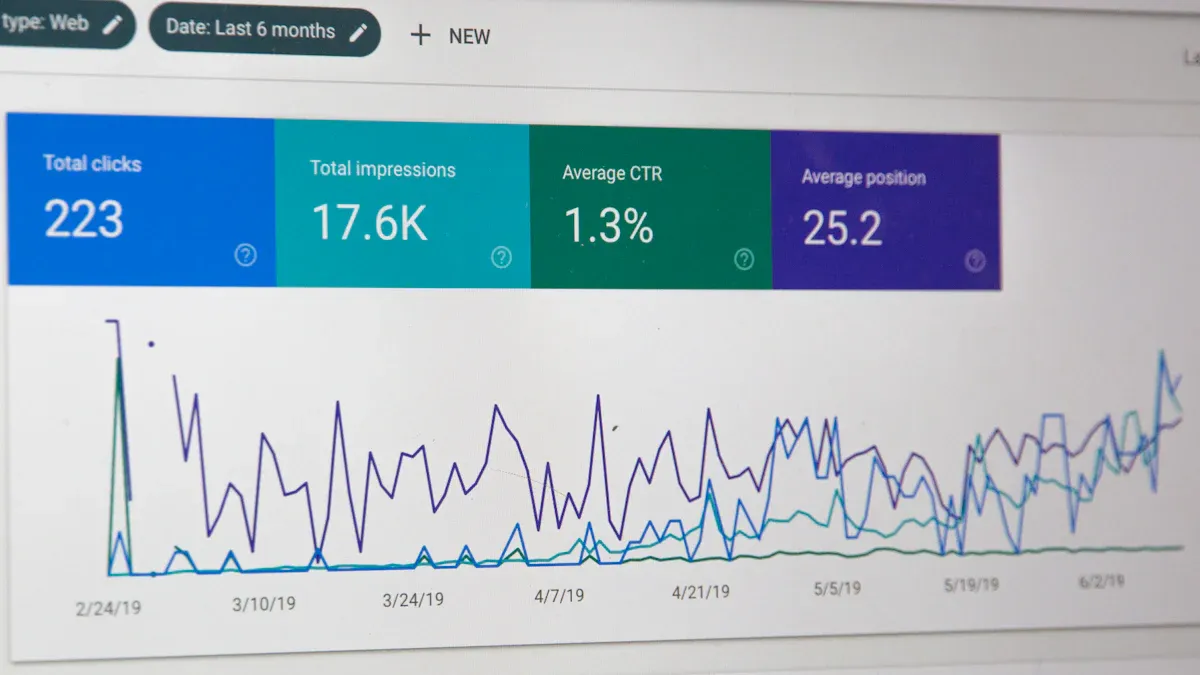
You must watch performance metrics to see how your brand and user content do. Social media monitoring api: how to track content tools put together metrics like views, shares, comments, and sentiment scores. You listen for changes in engagement and spot problems early.
Here are common performance metrics you watch:
Performance Metric | Description |
|---|---|
Brand monitoring | Track every mention of your company or product across social channels in real time. |
Competitive benchmarking | See how competitors do by watching their mentions and engagement. |
Audience sentiment analysis | Check if people feel good or bad about campaigns or events. |
Content performance reporting | Put together metrics (views, shares, comments) from many platforms into one analysis. |
You listen for spikes in posts, hashtags, and keywords. You spot sudden jumps in activity. You watch sentiment scores to catch negative feedback early. You track campaign problems and alert your team before they get worse.
You must keep discovering and alerting. Static reports do not help you catch issues early. Listening lets you act fast. You keep your brand safe and find new chances.
Callout: Continuous listening and monitoring help you spot content changes, brand mentions, and problems early. You do not just look at reports. You discover, alert, and respond right away.
If you want to learn more about using social media listening in your workflow, check out How to Build a Real-Time Brand Monitoring System or Social Media Listening Best Practices.
Integrating and Interpreting Social Media Listening Data
Aggregating Data Across Platforms
It is hard to watch your brand on many social channels. Each platform sends out information in its own way and at different times. If you check each one by hand, you might miss important mentions. You also waste a lot of time. Manual checks are too slow for social proof. You need one tool that brings all the signals together. This gives your team one view and helps you act fast.
With custom integrations, you can collect data automatically and put it in one place. This saves time and lets you see everything. You can watch every mention, track likes and comments, and see how your brand does against others. Social media monitoring APIs let you get real-time data, look at old posts, and collect likes, comments, and shares. You also get information about your audience, like age and location.
Feature | Capability |
|---|---|
Real-time data streaming | Live monitoring |
Historical archives | Spanning months or years |
Engagement metrics | Likes, comments, shares |
Demographic data | Age, location, interests |
You must organize and clean up data from different places. This is called data normalization. Native connectors and built-in tools help you make fields and numbers match. This makes sure your social proof is right and your team can trust the results. If you do not normalize data, you can make mistakes and bad choices.
Turning Data Into Insights
After you collect and clean your data, you need to study it for useful social media insights. Monitoring helps you find new trends and send alerts. Social media analytics helps you look back and report on what happened. You should set clear goals before you start listening. Use AI to look at lots of data and find patterns you might not see.
Watch for changes in how people feel, new topics, and problems that come up a lot. You can protect your brand by watching for bad feelings and acting before things get worse. Social proof from listening data shows what your audience likes and where you can do better. Custom integrations let you send what you learn to the right teams, so they can act fast.
Strategy Type | Description |
|---|---|
Sentiment | See if mentions are positive, negative, or neutral |
Trends | Find hashtags or topics getting popular |
Pain points | Spot complaints that happen again and again |
Opportunities | Notice customer needs others miss |
Communication | Share what you learn with the right teams |
Social media listening gives you a live look at your brand’s reputation. You can watch social proof, see how people feel, and keep your brand safe before problems get big. If you want to learn more about building a system like this, visit How to Build a Real-Time Brand Monitoring System.
Best Practices to Monitor Social Media Efficiently
Automation and Alerts
You want to save time and catch important changes fast. Automation helps you do this. With automation, you can schedule posts, manage messages from all platforms in one place, and use a visual calendar to plan your content. Smart tools like SmartQ suggest the best times to post. Bulk scheduling lets you plan many posts at once. RSS feed automation helps you find new content without searching. Automated reposting keeps your best content active. A unified inbox means you never miss a message. These tools turn hours of work into minutes. You can focus on listening for new trends and mentions instead of doing the same tasks over and over.
Tip: Set up real-time alerts for keywords, hashtags, and sudden spikes in activity. This helps you spot problems or viral moments before they get out of hand.
Privacy and Compliance
You must follow rules when you collect and use social media data. Each platform has its own terms of service. You need to know these rules so you do not lose access. Privacy laws like GDPR and CCPA protect user data, even if it is public. Always use consent-based data and respect user rights. Good APIs use strong authentication, collect only what you need, and keep data safe with encryption. They also let users control their data. You should check your process often to make sure you stay compliant.
Compliance Area | Description |
|---|---|
Terms of Service | Each platform has specific rules for data collection and use. |
Privacy Compliance | Follow laws like GDPR and CCPA, even for public data. |
Intended Use Restrictions | Never use data for harmful reasons. This can cause legal trouble. |
Note: Choose APIs that only access public and consent-based data. This keeps your brand safe and builds trust.
Common Pitfalls to Avoid
You can make mistakes if you do not plan your listening process. Do not try to track everything at once. Start with clear goals and focus on the most important keywords and mentions. Use the right tools to turn big data into useful insights. Real-time alerts and sentiment analysis help you act fast. Always keep human oversight in your process. AI can help, but people catch things machines miss. Do not skip regular reviews of your system. This helps you spot errors and improve your workflow. Filtering out noise is key. Too many alerts can hide real problems. Set up your system to highlight what matters most.
Remember: Good listening means you discover issues early, not just after reading reports. Stay alert, review your process often, and keep your brand safe.
You can use social media monitoring APIs to find changes and mentions early. These tools show you data right away and send alerts fast. You can act quickly before small problems get bigger. They give you helpful tips to keep your brand safe and make customers happy.
Capability | How It Helps Your Brand |
|---|---|
Sentiment Analysis | Spot bad feedback before it spreads |
Real-Time Tracking | Act fast when new trends appear |
Social Media Insights | Change your plan for better results |
First, look at the API instructions and plan a test project. Try out how it works, ask for feedback, and keep making your system better. The tips you get from monitoring help your brand grow and stay ahead.
FAQ
How can I spot brand mentions across different platforms in real time?
A social media monitoring API helps you find mentions fast. It collects mentions from many platforms at the same time. You can set alerts for keywords or hashtags. This lets you know about new talks right away. You can react quickly when people talk about your brand. Learn more in How to Build a Real-Time Brand Monitoring System.
What is the difference between monitoring and analytics?
Monitoring helps you find new mentions or changes as they happen. Analytics lets you look back at old trends and make reports. Use monitoring to catch problems early. Use analytics to see how things went over time.
How do I detect sudden changes or anomalies in social conversations?
Set up alerts for spikes in mentions or negative feelings. You can also watch for trending hashtags. These alerts help you act before problems get bigger. Dashboards help you see strange patterns fast.
Do I need coding skills to use a social media monitoring API?
Some APIs need a little coding to set up and change. Many tools have easy options with no coding needed. You can start simple and learn more as you go.
How do I keep my monitoring process compliant with privacy laws?
Always follow each platform’s rules and privacy laws. Only use public data or data people agree to share. Pick APIs that protect user privacy. Check your process often to make sure you follow the rules. Read more in Social Media Listening Best Practices.