Is the X API Different from the Twitter API? What Changed for Developers in 2026

You must update your apps today because the X API is very different from the old Twitter system. Big X API changes in 2026 impact your system layout, security rules, and running costs.
Platform changes fully swap old Twitter access plans with a strict pay-as-you-go system.
You no longer use fixed monthly payment plans. The platform now charges you directly for each request while setting new limits for every user. You manage your keys, track live data, and handle your spending with new tools at console.x.com. You should update your code right away to keep your service running smoothly on this updated API setup.
Key Takeaways
X swapped set monthly Twitter options for a strict system where you only pay for what you use.
Sharing website links now adds a big extra fee to your basic posting costs.
Storing information on your own device stops expensive extra fees for reading the same data again.
Developers need to use OAuth authorization tools to keep user access safe and secure.
The developer dashboard allows you to set firm spending limits so you can easily avoid unexpected charges.
Shifts in X API Pricing and Pay-Per-Use Billing
Transitioning from Tiers to Pay-Per-Use
The platform launched its new pay-per-use model on February 6, 2026. This move removed the old twitter API tiered structure completely. Developers can no longer choose a set monthly plan like the former Basic or Pro options. Instead, the current system tracks your actual platform usage with every single request.
The X Developer Platform Team officially announced the launch of the X API Pay-Per-Use pricing model, confirming the transition from fixed monthly subscription tiers to the new pay-per-use billing system on this date.
You pay only for your exact request actions under this new model. Small app creators often save money because they avoid the old $200 monthly fee. Large developer teams might see their costs jump well past old subscription limits.
User Profile | Legacy Subscription Tier | Metered Bill |
|---|---|---|
Low-volume app | Basic ($200/month) | Single-digit dollars |
Mid-volume app | Basic ($200/month) | $500+ metered |
High-volume app | Pro ($5,000/month) | Exceeds $10,000 metered |
Old accounts lost their fixed plans as new accounts moved to usage billing. Developers must watch their API call counts very carefully now. A simple background script can raise your daily costs very fast. You need to check each request inside your developer portal. This pricing setup forces every coder to write clean, efficient queries for all platform features.
Cost Breakdown for Writes, Reads, and Surcharges
New x api pricing rules started on April 20, 2026. These updated x api pricing rules set clear costs for different platform endpoints. Sending a standard post costs $0.015 for each attempt. However, adding links adds a large extra charge. A post containing a web link costs $0.20 every time. That change marks a huge price jump for automated link posts.
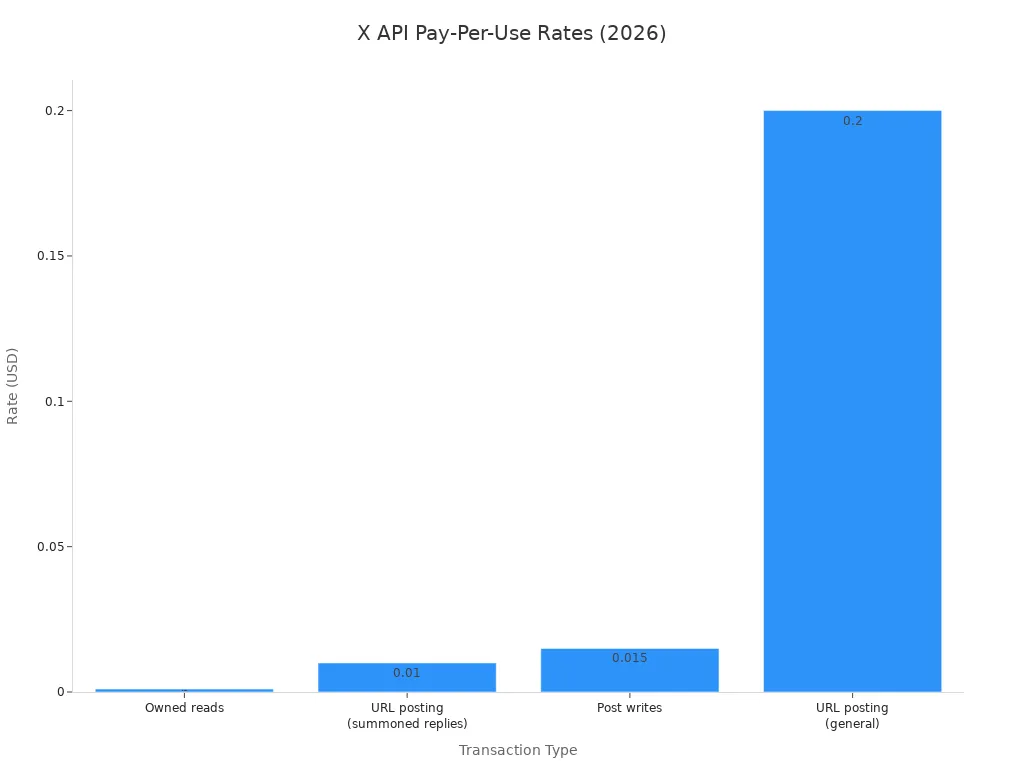
Data reading fees depend on account ownership and data types. You pay $0.001 per item for personal reads like your followers or own posts. Reading public data from other users costs $0.005 per item. Knowing these different price levels helps you guess your exact monthly bill easily.
Transaction Type | Exact Rate (USD) | Effective Date |
|---|---|---|
Post writes (POST /2/tweets) | $0.015 per post | April 20, 2026 |
Owned reads (GET /2/users/{id}/tweets) | $0.001 per resource | April 20, 2026 |
URL posting surcharge | $0.20 per post | April 20, 2026 |
Data requests add up fast when you handle large tweet volumes. Reading ten thousand items costs roughly $50 under usage billing. Reading one hundred thousand items pushes your price to $500. One million reads raise your bill to $5,000. Requesting two million items creates a huge $10,000 charge. These numbers prove that heavy API use grows your expenses quickly.
Total Monthly Cost = (Writes x Rate) + (Reads x Rate) + Link Surcharges
You can no longer use a cheap flat-rate read-only api plan. Old twitter apps often requested data constantly without any real need. Modern x api apps must save data locally to stop double charges for repeated reads. You must rewrite your data loops to safeguard your budget. You control your total expenses by making every request count. Smart coding keeps your app running well without costly money surprises. Developers using twitter endpoints can control pay-per-use costs with good planning. You should review all your code routes today.
Endpoint Architecture and Data Access in the API
Endpoint Functional Status Under New Billing
The modern x api reshapes how endpoints handle requests under pay-per-use billing. Monitor specific limits for individual endpoints during operations. For example, POST /2/tweets route constraints require tracking to prevent api errors.
Counter Type | Description | Key Detail |
|---|---|---|
Per-endpoint window | Resets in minutes (usually 15) | Only counter reported in response headers |
Per-endpoint daily cap | Resets in 24 hours | Not reported in any header; must be tracked client-side |
Billing cap | Prepaid usage or monthly ceiling | Identified by |
When hitting rate limits on any api endpoint, the system returns status 429. Handle HTTP 429 error bodies by following these steps:
Check the
typefield in the 429 error body:.../rate-limit-exceededmeans you were too fast;.../usage-cappedmeans you spent the budget.For
usage-capped: Do not retry. Alert a human. This is a billing event, not a rate limit.For window 429: Sleep until
x-rate-limit-resettimestamp, then retry once.For daily cap 429: Reschedule. Do not retry within the same 24-hour window.
Note:
x-rate-limit-remaining: 0on a 200 response should be treated as rate-limited.
Search and Stream Access Controls
Data system policy changed after the twitter transition to a pay-per-use model. Legacy read access options no longer exist under any platform plan. You pay metered fees for all data reads when pulling public tweets. Executing search tweets queries requires direct pay-per-use payment per item.
Developers must optimize data loops across all active endpoints to control costs and maintain api stability. Legacy twitter tools fetched tweets repeatedly without local storage. Modern pay-per-use streams bill your account for reads sent over feeds. Store incoming reads locally to prevent redundant reads.
You manage overall rules across system endpoints through your active payment plan. Every query for target tweets increments total recorded reads. Filtering real-time stream data reduces data reads before processing. This strategy lowers metered fees on the x api service. Efficient usage keeps total reads manageable under pay-per-use api rules for your overall api workflow.
Authentication Protocols and Per-User Rate Limits
Managing OAuth 1.0a and OAuth 2.0 Tokens
The platform holds core API login controls active during this pay-per-use move. You need OAuth 1.0a or OAuth 2.0 Authorization Code Flow with PKCE for user requests. These security keys give user entry when your app posts content, searches accounts, checks geo points, reads messages, or gets email addresses. System rules ban app-only keys for account changes. Writing actions in the X Ads API specifically need OAuth 1.0a with user context.
You must save access keys and refresh tokens with safe, fixable encryption tools. Easy hashing fails regular system checks. Also, developers must make lock systems to stop unsafe race problems during live token refresh tasks. You must watch key expiration clocks very closely. System API safety needs quick cancel spotters. Your code must start fresh login flows whenever user keys expire or lose allowed permissions.
Bearer Token Allocation and Endpoint Limits
The pay-per-use plan places clear system usage speed limits across two main API levels. App limits score queries sent with your main app bearer token on general paths. On the other hand, user speed limits watch single user actions across exact routes. For example, the DELETE /2/tweets/:id endpoint caps each logged-in user at 17 calls every 24 hours. Main app tokens cannot change account details or skip single user limits.
Your live billing setup controls total usage costs, but it never wipes user action counters. Platform networks mark monthly post limits as separate caps on posting actions. So, a usage plan bills for total request counts without raising normal rate limit walls. You need to check that approved rights match asked rights right after user login ends. Build strong backend code so your requests dodge normal API walls and sudden money stops across all endpoints.
Developer Console Tools for the X API
Usage Tracking at Console.x.com
You watch your app traffic through the updated developer console. The dashboard shows live activity stats for every active API endpoint. You can check total request counts for reads and writes in live graphs. This screen breaks down data use into clear pathways under the pay-per-use system. You find software bugs fast because the portal updates diagnostic graphs all day long. You track performance trends to keep your system running safely.
System monitors record every single call under the active pay-per-use plan. This live view helps coders find broken background scripts before large costs build up. You review data usage history to tweak your API queries for better savings. Your team sorts past performance by specific app keys or active build environments. These helpful diagnostic tools give you full control over software operations across all system paths.
Managing App Credentials and Billing
Handling access keys requires direct control inside your account management console. You create user tokens, set access permissions, and cancel client secrets safely in the security tab. The current X API setup links your active login keys straight to account settings. You maintain strong safety rules by changing your security keys on a regular schedule. You manage team permissions across different projects without stopping active software services.
The built-in billing panel tracks your total usage numbers against your chosen project limit. You set up auto-stop rules to prevent large charges during sudden traffic spikes. The X API system pauses code requests when your account hits its set pay-per-use limit. Keeping tight control over your budget makes your costs easy to predict across all linked services.
You manage account spending controls by following these key administrative tasks:
Set strict monthly pay-per-use spending limits inside your main account settings.
Set up automated email alerts when you get close to your budget limits.
Check active API keys so you can turn off unused extra credentials.
You need to adjust your app setup to stay ahead right now. You check daily expenses in the console.x.com portal to protect your money. Programmers manage pay-per-use tasks without spending extra by safeguarding OAuth login details and organizing smart rate limit plans.
You cut overall bills by using a mixed setup for each active api connection. You use the main x api for writing tasks while sending read requests through extra api tools. This pay-per-use setup cuts down on metered api data costs. A third-party read plan costs $49 each month for 10,000 tasks and includes 100 free test requests. Using this pay-per-use plan keeps your budget safe under new api rules in 2026.
FAQ
How does the new pay-per-use model replace legacy twitter subscription plans?
The platform got rid of set monthly plans like Basic and Pro on February 6, 2026. You now pay exact metered fees for every single call. You track real-time call counts through console.x.com to manage your costs easily.
What specific fees apply when posting content through the api?
Normal post writes cost $0.015 per try under active price rules. Adding web links adds a $0.20 extra fee for every single post. You must track outgoing post links to stop fast budget jumps.
Do core OAuth authentication flows still function under modern api rules?
Yes, OAuth 1.0a and OAuth 2.0 with PKCE still work completely fine. You must use user account keys for write tasks, while app keys control main usage limits across all system paths.
How can you reduce metered data costs for legacy twitter read queries?
You save pulled data locally to stop paying extra fees for repeated searches. Old twitter tools billed non-stop reads, but saving data cuts down reading costs under new api rules.