What Is the Twitter/X API? A Practical Guide to Search, Timelines, and Reporting in 2026

What Is the Twitter/X API?

The Twitter/X API is the connection layer between X and your application. It allows software to request public posts, user information, timelines, search results, engagement metrics, and other supported data without manually opening the platform.
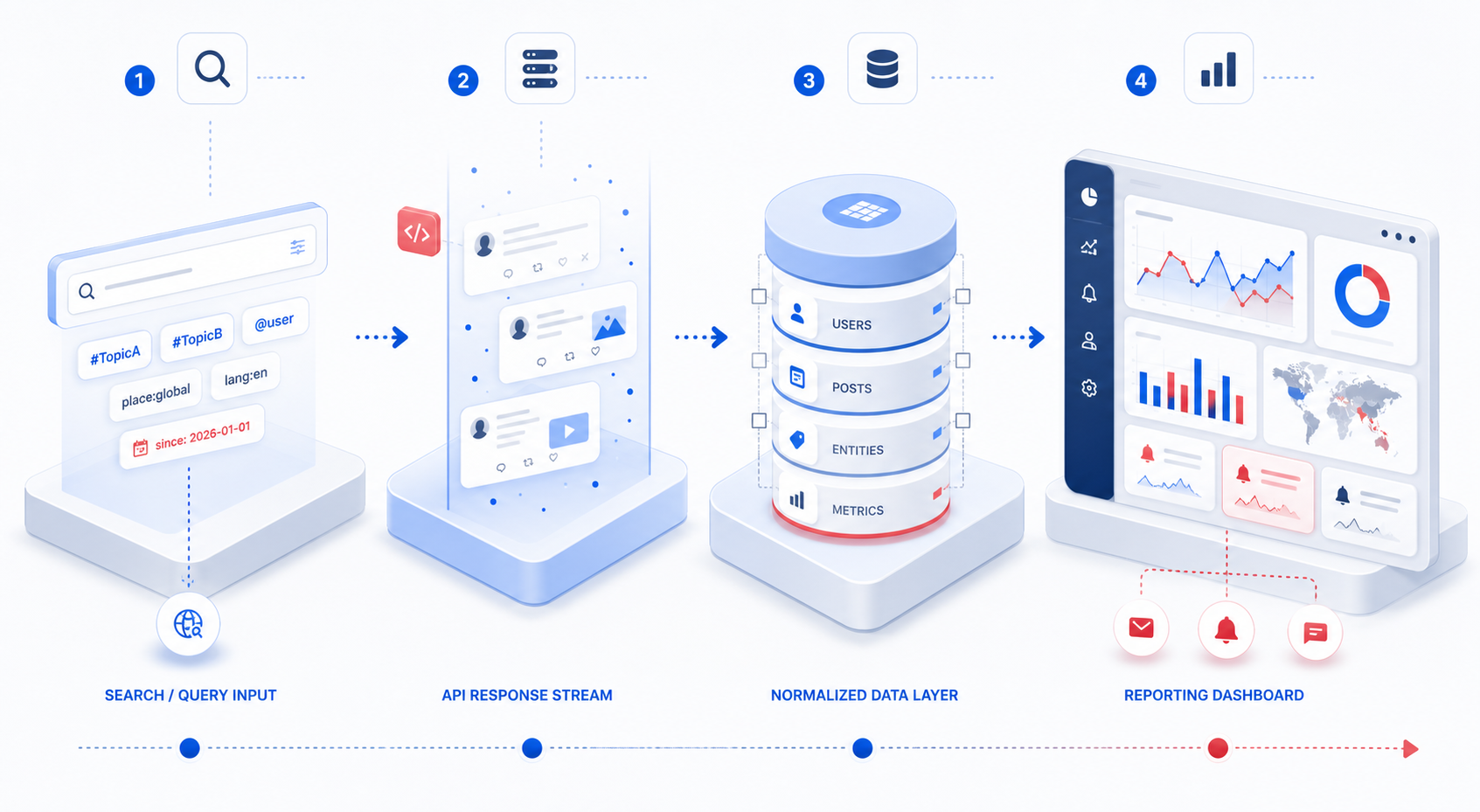
In practice, most people searching for “Twitter API” are trying to solve one of four problems:
Monitor brand mentions or keywords
Collect posts from specific accounts
Build a social media analytics dashboard
Automate recurring reports
The difficult part is not sending an HTTP request. The difficult part is knowing which endpoint, authentication method, fields, and access level match the job.
If you are comparing available endpoints and data workflows, you can first review KeyAPI’s Twitter API to see how Twitter/X data can fit into a broader social media collection system.
The Short Answer
The Twitter/X API can help you:
Search recent posts using keywords or operators
Retrieve posts published by a specific user
Read public user profile information
Collect replies and timeline activity
Track public engagement metrics
Create monitoring and reporting systems
Publish or manage posts when the account has the required permissions
It is not an unlimited copy of the X website. Every endpoint has its own authentication requirements, access rules, rate limits, and available fields.
That difference matters. A request may be technically correct and still fail because the application does not have access to that endpoint.
What Can You Actually Do with the Twitter/X API?
Search for Recent Posts
The recent search endpoint is useful when you need to find posts that match:
A brand name
A product name
A campaign hashtag
A competitor
A customer complaint
An industry phrase
A simple request may look like this:
curl "https://api.x.com/2/tweets/search/recent?query=KeyAPI%20API&max_results=10&tweet.fields=created_at,public_metrics,author_id" \
  -H "Authorization: Bearer YOUR_BEARER_TOKEN"
The response can include:
Post ID
Text
Creation time
Author ID
Like count
Reply count
Repost count
Quote count
The important point is that search results are only useful when the query is designed carefully. A broad query such as API may return a large amount of irrelevant content. A better monitoring query usually combines the brand term with exclusions, language filters, or related phrases.
For example:
("KeyAPI" OR "keyapi.ai") lang:en -is:retweetThis produces cleaner data than searching for the brand name alone.
Retrieve Posts from a User
When you already know which account matters, user timelines are usually more practical than keyword search.
A timeline workflow can support:
Competitor publishing analysis
Creator monitoring
Industry news tracking
Customer account research
Content frequency reports
The normal sequence is:
Find the user ID.
Request the user’s posts.
Store the post ID and timestamp.
Save public metrics as a snapshot.
Compare later snapshots.
Do not save only the current follower or engagement count. Social data changes. If you overwrite yesterday’s number with today’s number, you lose the ability to measure growth.
Read User and Post Information
The API can return different objects depending on the endpoint and requested fields.
A user record may include:
User ID
Username
Display name
Biography
Account creation date
Profile image
Public metrics
A post record may include:
Text
Created time
Language
Conversation ID
Referenced posts
Public engagement metrics
Author ID
The fields returned by default are often limited. If a report needs created_at or public_metrics, those fields should be requested explicitly.
Build Monitoring Alerts
An API becomes more valuable when it is connected to a workflow.
A basic brand-monitoring system can:
Run a search query every 10 or 30 minutes.
Store new post IDs.
Remove duplicate results.
Classify posts by topic or sentiment.
Send an alert when volume passes a threshold.
Record the result for later reporting.
For example, a sudden increase from 20 brand mentions per day to 180 mentions may indicate a successful campaign, a product problem, or a customer-service issue. The API does not decide which one happened. It provides the evidence needed to investigate.
Which Authentication Method Should You Use?
Authentication is one of the areas that causes the most confusion because the same API may support different access methods.
Bearer Token for Application-Only Requests
A Bearer Token is commonly used for application-only access to supported public data endpoints.
This can be suitable for:
Recent public post search
Public post lookups
Some user and timeline requests
Internal monitoring jobs
Application-only access does not represent a specific user account. It is better suited to reading publicly available data than performing actions on behalf of a user.
OAuth 2.0 for User Context
OAuth 2.0 with Authorization Code and PKCE is more appropriate when a user needs to authorize your application.
Typical examples include:
Connecting a user’s account
Posting on behalf of a user
Accessing user-specific resources
Building a product with login and account permissions
The user must approve the requested scopes. Asking for more permissions than the feature needs makes the integration harder to explain and harder to maintain.
OAuth 1.0a
Some X workflows and legacy integrations still use OAuth 1.0a user-context authentication. Whether it is the right choice depends on the endpoint and the SDK being used.
The practical rule is simple: check the authentication requirement on the endpoint reference before writing the integration. Do not assume that a Bearer Token works everywhere.
What Data Should You Store?
A common mistake is to collect the API response and immediately display it in a dashboard without designing a storage model.
For a monitoring or reporting workflow, store at least:
Field | Why it matters |
|---|---|
| Prevents duplicate records |
| Connects posts to account-level data |
| Supports date and time analysis |
| Allows topic or sentiment classification |
| Measures engagement |
| Shows why the post was collected |
| Shows when the data was captured |
| Separates search, timeline, or manual imports |
The fetched_at field is especially important. A post’s public metrics are not permanent values. If the same post is collected every day, each collection should be treated as a new observation rather than a replacement of the previous record.
A Practical Snapshot Example
Suppose a post has these numbers on Monday:
Likes: 42
Replies: 6
Reposts: 11
Quotes: 2
On Thursday, the same post has:
Likes: 71
Replies: 9
Reposts: 18
Quotes: 3
The useful result is not simply “71 likes.” The useful result is that the post gained 29 likes and 7 reposts during the period.
That difference can help a content team understand whether the post continued spreading after publication.
Search Data Is Not the Same as Analytics Data
Search answers:
Which posts match this query?
Analytics answers:
What changed, and why does it matter?
Search data is useful for discovery, but it does not automatically provide a complete performance report. A reliable report normally combines:
Search results
User information
Post metrics
Collection timestamps
Topic labels
Campaign or content categories
This is why simply exporting posts to a spreadsheet often produces disappointing reports. The data exists, but there is no consistent structure for comparison.
Common API Errors and What They Usually Mean
Status | Common meaning | What to check first |
|---|---|---|
| Invalid request or parameter | Query syntax, endpoint, required fields |
| Authentication failed | Token, header, token type |
| Access is not allowed | App access level, permissions, endpoint availability |
| Resource not found | User ID, post ID, or URL |
| Rate limit or usage cap reached | Rate-limit headers and request frequency |
| Temporary server error | Retry strategy and X status information |
A 401 error usually points to credentials or an incorrect authentication method. A 403 error is different: the credentials may be valid, but the application is not permitted to perform that request.
A 429 response should not be handled by immediately sending more requests. The application should read the rate-limit headers, wait for the reset time, and apply backoff logic.
For a detailed troubleshooting workflow, see Best Practices for Managing Twitter API Key Troubles.
Why a Working Request Can Still Produce a Bad Report
A successful HTTP response does not guarantee useful analysis.
Several issues appear frequently in real projects.
Duplicate Posts
Search queries can return the same post through different collection cycles. Always use the post ID as the primary deduplication key.
Missing Fields
If the request does not ask for created_at, public_metrics, or other required fields, the response may be technically successful but incomplete.
Changing Metrics
Public metrics can increase after the first collection. Reports should preserve historical snapshots instead of treating the newest response as the only truth.
Deleted or Restricted Content
A post may disappear, become unavailable, or return partial information later. Reporting systems should not treat missing data as proof that the post never existed.
Poor Query Design
A query that is too broad creates noise. A query that is too narrow misses relevant conversations. Search rules should be tested against real examples before being used in production.
When Should You Use the Twitter/X API?
The API is a good fit when you need repeatable data collection rather than a one-time manual lookup.
Use it for:
Brand and keyword monitoring
Competitor content tracking
Social media dashboards
Creator or account research
Campaign reporting
Customer-service alerts
Historical snapshots of public content
Feeding structured social data into an AI workflow
It may be unnecessary when you only need to check one account once a month. In that case, manual research may be faster and cheaper than building an API pipeline.
The right question is not “Can the API collect this data?”
The better question is:
Will collecting this data regularly help the team make a better decision?
If the answer is no, adding another endpoint will only create more storage and maintenance work.
How to Start a Small Twitter API Project
A practical first version does not need a large dashboard.
Start with one use case:
Choose one search query or one account.
Select the minimum fields required.
Run the request manually.
Save the raw JSON response.
Store the important fields in a table.
Repeat the request on a schedule.
Compare the snapshots after several days.
This approach exposes problems early. You will discover whether the query is too broad, whether the endpoint returns the fields you need, and whether your access level supports the expected workflow.
Only after the data is stable should you add dashboards, alerts, sentiment classification, or AI summaries.
Twitter/X API or a Unified Social Media API?
The official X API is useful when your product is built mainly around X and you need direct control over its endpoints.
A unified API becomes more practical when the same reporting workflow must also include platforms such as TikTok, Instagram, YouTube, or Threads.
For example, a marketing team may want one report containing:
X post mentions
TikTok video performance
Instagram Reels engagement
YouTube video metrics
Building each connector separately means managing several authentication systems, response formats, rate limits, and data models. A unified layer can reduce that integration work, provided the provider clearly documents which fields and endpoints are supported.
The choice depends on the project:
Situation | More suitable route |
|---|---|
One X-focused application | Official X API |
Internal X monitoring | Official API or a specialized provider |
Multiple social platforms | Unified social media API |
Fast prototype | Managed API service |
Complex platform-specific features | Direct platform integration |
Frequently Asked Questions
Is the Twitter API the same as the X API?
Twitter was rebranded as X, but many developers still search for “Twitter API.” Current documentation and platform references commonly use “X API,” while older libraries, URLs, and community examples may still use Twitter terminology.
Can the Twitter/X API search all historical posts?
Not automatically. Historical search availability depends on the endpoint, access level, and current product rules. Always check the endpoint documentation and your developer dashboard before designing a full-archive workflow.
Can I use one Bearer Token for every endpoint?
No. Authentication requirements vary by endpoint. Some requests support application-only access, while user actions and user-specific resources may require user-context authentication.
Why does my request return 403 even though the token is valid?
A valid token does not guarantee permission to use every endpoint. Check the app’s access level, required scopes, endpoint availability, and whether the account or project is enrolled for that product.
How should I handle 429 Too Many Requests?
Stop sending requests temporarily, read the rate-limit headers, wait for the reset period, and use exponential backoff. Increasing request frequency usually makes the problem worse.
Is the Twitter/X API useful for AI applications?
Yes, when the data is collected with a clear purpose. Structured posts, timestamps, author IDs, engagement metrics, and query labels can support classification, summarization, monitoring, and alerting workflows. AI should process a well-designed dataset, not compensate for messy collection logic.
Final Takeaway
The Twitter/X API is not simply a way to download posts. It is a set of controlled data and action interfaces that can support search, account monitoring, reporting, and automation.
A reliable implementation usually has four characteristics:
It uses the correct authentication method.
It requests only the fields the workflow needs.
It stores historical snapshots instead of overwriting data.
It treats access limits and missing data as part of the system design.
Start with one real reporting problem, test one endpoint, and validate the returned data before building a larger platform. For broader social media data workflows and API-based reporting, visit the KeyAPI homepage to compare available platform integrations.