Understanding X API Pay Per Usage Pricing and Developer Costs

On February 6, 2026, X announced a switch to pay-as-you-go billing, which works like AWS or Google Cloud services.
You handle developer access using a pay-per-use system with a $0 starting fee. This current x api update replaces the old fixed plans with a flexible pay-as-you-go model. You control your API cost through pay-per-use pricing.
Operation | Cost |
|---|---|
Read post | $0.005 |
Create post | $0.015 |
Link post | $0.20 |
Active free tier developers get a $10 credit voucher. You can earn xAI credit rewards of up to 20% on your total spend. This new pricing structure replaces legacy twitter api pricing and lowers overall costs with simple x api pricing.
Key Takeaways
The X API lets you pay only for what you use, and it costs nothing to get started.
Basic text posts carry small fees, but adding links raises the creation price to twenty cents.
Developers who set spending limits on their dashboard avoid getting unexpected bills.
Apps can save money by keeping old data on your device to stop repeat reading fees.
Developers who spend a lot of money can get up to twenty percent back as bonus credits.
Pay-Per-Use Rates and Endpoints

This new pay-per-use model changes how you track app costs. You spend money only on the exact tools your software requests.
Read and Write Endpoints
Each API call costs a different price depending on its job. Read actions get information, while write actions push new content to the platform.
Endpoint Category | Rate per Call |
|---|---|
Owned (e.g., owned reads, account information) | $0.001 |
Standard (e.g., tweets, timelines) | $0.005 |
User/DM/Following (e.g., user lookup, direct messages, following list) | $0.010 |
Write endpoints cost extra to run compared to basic read requests. Creating a standard post costs $0.015 per call, but direct message actions cost $0.010 per call. Also, special endpoints like owned reads lower your price down to $0.001 per request.
Endpoint | Category | Cost per Request |
|---|---|---|
Post (Read) | Read | $0.005 |
User (Read) | Read | $0.01 |
DM Event (Read) | Read | $0.01 |
Content (Create) | Write | $0.01 |
DM Interaction (Create) | Write | $0.01 |
User Interaction (Create) | Write | $0.015 |
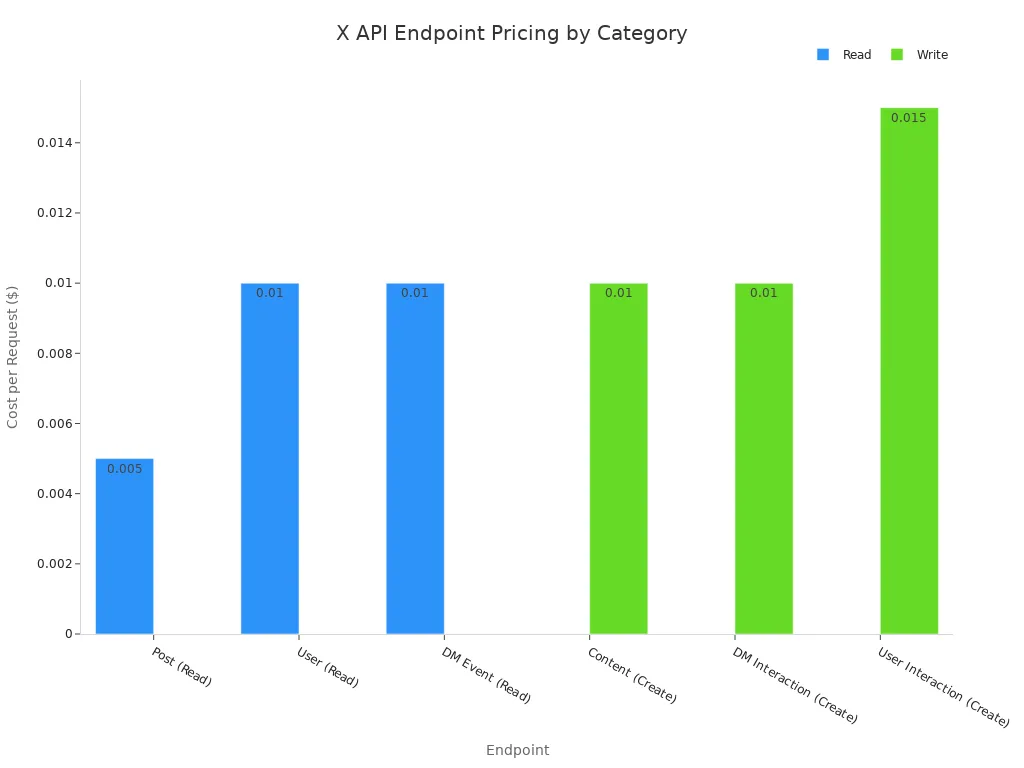
You must check your call total carefully because different api tasks carry different costs across your app.
Post Creation and Read Costs
Publishing posts takes smart planning under this pricing system. Simple text posts charge a predictable fee, but adding links adds an extra cost.
text posts at roughly $0.015 and URL-containing posts at $0.20.
Adding web links or media URLs bumps normal post creation to $0.20 per post. The API adds this extra fee automatically whenever your request includes a URL.
The pay-per-use credit system features a $0 base fee without any forced monthly payments. You can set custom spending limits in your dashboard to stop surprise bills.
This setup changes app costs compared to old subscription plans.
For high-posting, low-reading apps: 500 link-free posts every month cost $7.50 with pay-per-use, compared to $200 on the old Basic plan, making pay-per-use far cheaper.
For 5,000 posts and 10,000 reads, pay-per-use costs $125 instead of $200 for Basic, which is still a better deal.
For 50,000 posts, pay-per-use costs $750, going over the $200 Basic limit, but it allows much more posting room.
For high-reading apps (100,000 reads/month), pay-per-use costs $500, rising to $10,000 for 2 million reads, making it pricier than the old Pro plan at $5,000.
For multi-user posting (like 50 users, 10 posts/day), 15,000 link-free posts cost $225 versus $200 Basic, slightly more; with links, it costs $3,000 versus $200, which is far pricier.
The matching point for link-free posts is near 13,000 posts each month; below that number, pay-per-use stays cheaper than Basic.
Developers switching from old access plans receive special savings. Active users leaving the old free tier get a single $10 sign-up bonus credit.
Cumulative Spend (USD) | xAI API Credit Percentage |
|---|---|
Below $200 | 0% |
$200 – $499 | 10% |
$500 – $999 | 15% |
$1,000 and above | 20% |
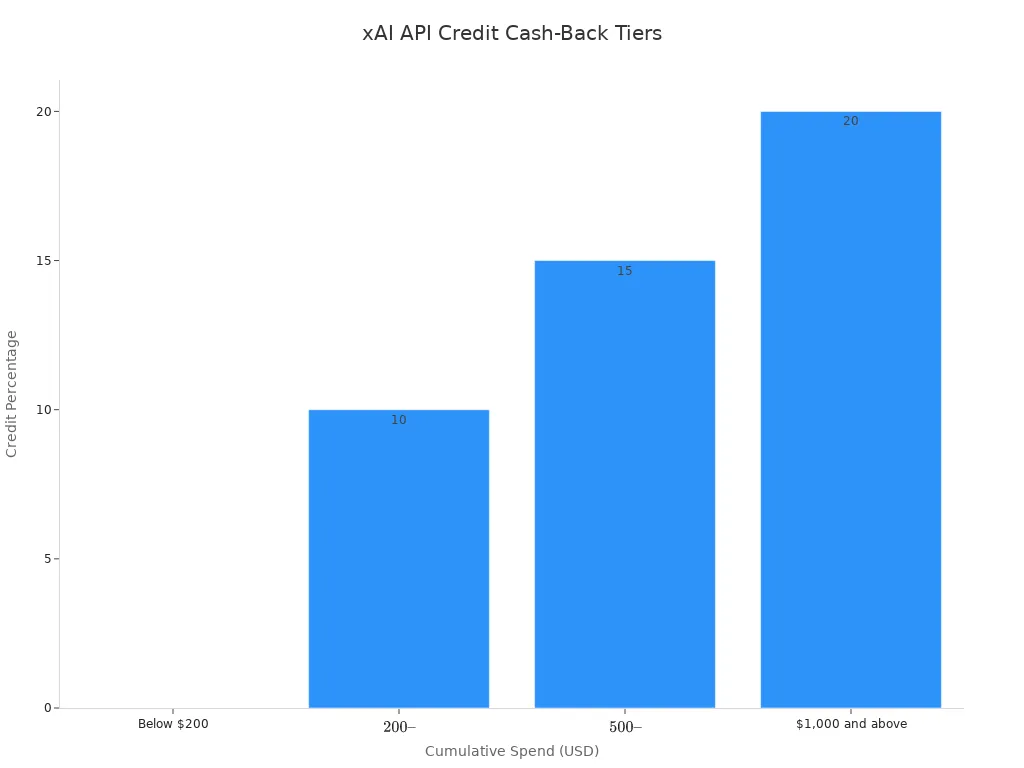
You can earn back up to 20% in xAI api credits depending on your total spending in a monthly billing cycle. A developer spending $1,000 gets $200 back in xAI credit bonuses. These bonus perks help protect your developer software budget as you send more server requests. Understanding x api pricing lets you build great software while managing your money. Your x api access stays open for any coding project.
X API Caps and Limits
Monthly Read Cap Rules
Keep an eye on your server traffic with this flexible usage system. Regular accounts get a hard limit of 2,000,000 post reads each month. Choose your user plan when you register your software project. The platform gives everyone this basic allowance to keep systems running smoothly.
Going over your account limit changes how billing works. Extra usage fees apply so your app stays online without stopping.
The X API enforces a monthly read cap of 2,000,000 Post-reads per month across all subscription tiers (Basic, Pro, Enterprise). Exceeding the cap triggers usage-based overage fees: $0.005 per additional Post read, $0.010 per User or DM read, $0.001 per Owned Read, and $0.200 per Post-with-URL.
Track monthly data requests to control overall software expenses. Stable api connections prevent app outages. Paying for extra usage keeps your account active during busy times. Watch your usage limits constantly to prevent surprise costs on your bill.
Rate Limits and Upgrades
The system tracks your data requests in short 15-minute windows. Quick surges in traffic will check your code setup. Spread out your automated tasks to safeguard your account level. Every plan sets clear speed limits for sending information.
Busy applications will eventually hit these usage boundaries. Heavy pay-per-use traffic requires stronger account power.
Standard pay-per-use plans limit monthly reading to 2,000,000 post reads.
Passing this cap requires moving to the enterprise tier for live data feeds.
Big companies pay at least $42,000 monthly for specialized business systems.
Ask for custom business deals to unlock extra x api speed. Upgrading your account gives you unmapped access choices. Your team decides how to grow your software. Review prices to choose the right fit for your spending plan. Enterprise tiers deliver top api speed and power.
X API Pricing Formulas and Workloads

Calculating Monthly Developer Spend
You can figure out your total expenses on the pay-per-use model by counting every action. Standard reads cost half a cent each, while basic writes cost one and a half cents.
Operation | Rate | Example Volume | Calculation | Cost |
|---|---|---|---|---|
Post reads | 0.005 per resource | 10,000 | 10,000 ×0.005 | $50 |
User profile reads | 0.010 per resource | 10,000 | 10,000 ×0.010 | $100 |
Plain post write | 0.015 per request | 1,000 | 1,000 ×0.015 | $15 |
Post with URL write | 0.20 per request | 1,000 | 1,000 ×0.20 | $200 |
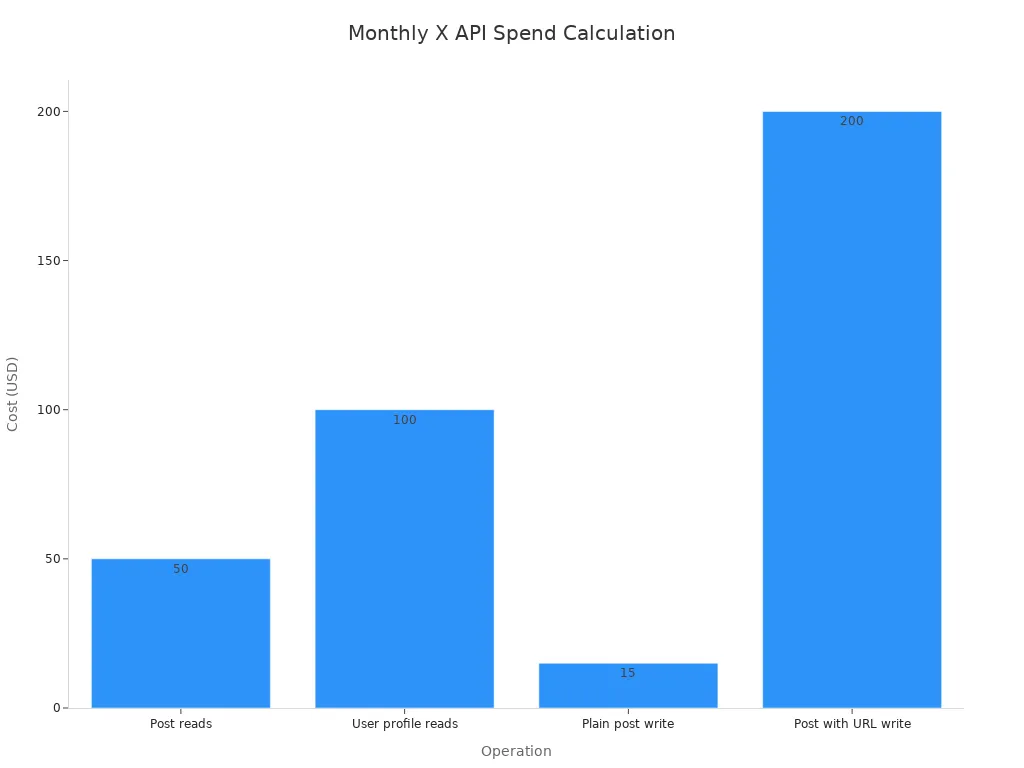
Always check whether your software program includes outside web links. Including any link increases the creation fee to twenty cents for that item. Reading user profiles charges a penny per task, while owned reads use a cheap tenth-of-a-cent rate.
Monthly read cost (official X) = tweets needed × price per resource
Your total monthly bill moves up or down based on how often your app checks for data. Fetching the exact same post twice in a day does not add extra charges. However, broken network requests and automatic retries will increase your total call counts. You can guess your spending across every level using simple math tricks.
Optimizing Bot and Analytics Costs
Different coding projects impact your total platform costs under this flexible pricing model. A finance team running a monitoring bot spent $5,000 monthly, mainly on standard read requests. By sending those read tasks to a cheaper third-party provider and keeping basic write actions on the official platform, their overall cost fell below $200, saving them 96 percent.
Programmers creating automated bots or data tools must organize their network traffic wisely to avoid hitting expensive rate tiers.
Store past server answers locally so your app avoids making duplicate read calls to lower expenses.
Combine several small data updates into single group requests to lower overall write counts.
Send simple data questions to lighter processing systems to manage your token handling fees.
Coders can easily maintain low x api pricing by cutting out unnecessary code commands. Projects that process huge amounts of post reads should consider using cheaper outside proxy services. Small projects reading 5,000 posts every month spend just $25, which remains lower than older fixed plans. Picking a smart data plan keeps your software profitable across every access tier, basic tier, free tier, entry tier, standard tier, and premium tier.
Legacy Tiers and Third-Party Alternatives
Fixed Plans versus Usage Billing
Old subscription tiers forced you to pay flat monthly fees regardless of your actual traffic. You paid set costs for fixed monthly bundles under the legacy twitter api pricing. The new pay-per-use structure replaces those rigid options. This usage-based model charges your project only for active server calls. You avoid paying high base fees when your code handles small task volumes.
Official X API access provides 100% data coverage and real-time freshness, whereas third-party providers deliver 80-95% coverage with slight delays.
Modern pay-per-use flexible plans scale your billing directly alongside your platform growth. Old pricing tiers cut off your integration access the moment you hit strict data ceilings. Now you keep full access while paying standard rates per request. This clean x api pricing structure simplifies your budget planning and protects your project from sudden service shutdowns.
Third-Party Proxy Options
Many developers evaluate third-party proxy options to manage heavy data reads. Outside providers give you predictable pricing models to fetch public platform information.
Service | Pricing Model | Plans | Comparison to X API |
|---|---|---|---|
TwtAPI | Tiered monthly subscriptions | Free: 300 calls, Basic: $15/50k, Plus: $40/150k, Pro: $90/400k, Ultra: $350/1M, Mega: $500/2M | Fixed bundles vs X's per-resource pricing ($0.005/Post read, $0.010/User read); suitable for read-heavy monitoring but not for write operations |
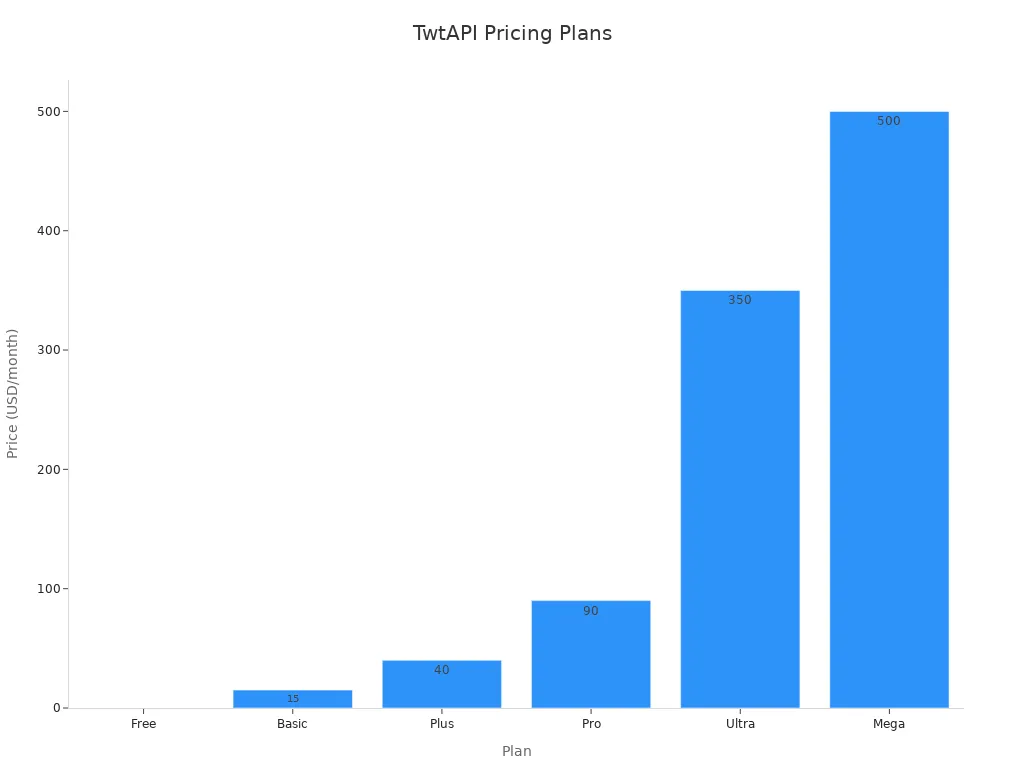
Alternative web scrapers change your api access pricing by shifting how you buy platform data.
ScrapeBadger provides high pricing predictability using credit-based systems.
ScrapingBee offers usage-based tools for general data collection.
ScrapingDog uses pay-as-you-go credit rates for search tasks.
TwitterAPI.io charges $0.15 per 1,000 tweet reads, cutting costs 96% compared to old twitter api pricing.
Oxylabs delivers contract-based plans for large enterprise integration needs.
Choosing third-party services can lower reading costs for developer software, but official x api channels guarantee full data quality and legal safety. Third-party options might lack complete data or experience delivery delays. You must balance lower proxy costs against your software needs for real-time accuracy and stable platform access.
You can lower your software costs on the flexible pay-per-use plan by forming simple habits. Track your spending using pay-per-use rules and set clear cost limits inside your main dashboard.
Use smart caching methods to stop extra charges when looking up identical posts on the same day.
Pick custom spending limits and turn on auto-recharge to handle your balance easily.
Watch your daily usage using the api metrics tool to block unexpected costs on your account bill.
Plan your data requests carefully around your budget to keep your software working without problems.
Checking your monthly caps keeps your overall service running smoothly. Big spenders can earn up to 20% back through xAI api credit rewards. Good management of your pay-per-use credits controls your developer pricing as you grow your app with api access.
FAQ
What is the base fee for the new X API model?
Under this new pay-per-use plan, your starting cost is zero dollars. This flexible setup lets you manage your API budget without being locked into a monthly contract. The system simply tracks your activity and bills your account for what you use. For instance, looking up a post costs half a cent, while creating a basic text post costs one and a half cents.
How do third-party proxy services compare to the official platform?
Using an outside proxy service gives you an alternative way to gather data at lower prices. Even so, these outside tools often miss some information compared to the official network feeds. You still have to use official platform connections if you want your app to publish new content. Still, picking an outside proxy is a smart way to cut costs if your software mainly focuses on gathering posts.
How does the new pricing differ from legacy twitter api pricing?
In the past, legacy twitter api pricing pushed builders into strict monthly packages with expensive subscription rates. The current usage-based setup replaces those rigid tiers with flexible billing based on your activity. You pay solely for the requests your app sends, which keeps expenses manageable for lighter software projects.
What happens if your application exceeds the monthly read cap?
The platform places a firm allowance of 2,000,000 post lookups on your account every month. If your app goes past this ceiling, extra pay-per-use charges will automatically apply to every new request. Apps that handle massive amounts of data can either bump up their official platform tier or fetch public data through an outside provider.